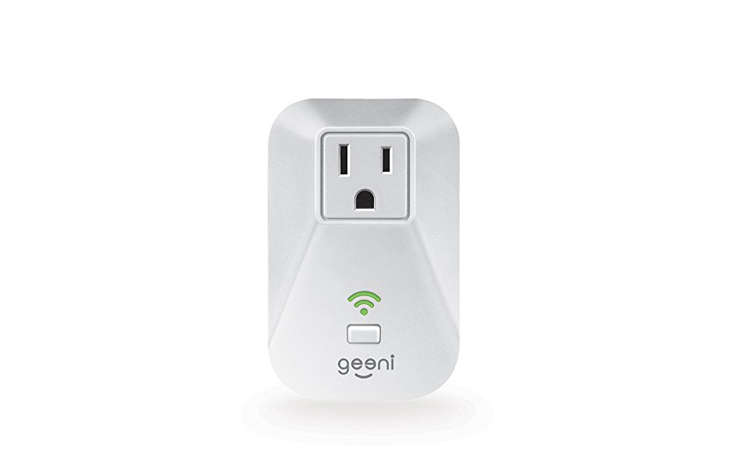

There are smart home gadgets that promise to change your life, and then there are smart plugs, which quietly do something more realistic: they make your old lamp, fan, humidifier, or coffee corner a little less dumb. The Geeni ENERGI Energy Tracking Wi-Fi Smart Plug belongs to that second, very practical group. It does not ask you to remodel your house, install a hub, or speak fluent electrician. You plug it into a wall outlet, connect it to Wi-Fi through the Geeni app, and suddenly a regular appliance can be turned on, turned off, scheduled, timed, monitored, and bossed around by voice commands.
The extra trick is energy tracking. Instead of only acting like a remote-control outlet, the Geeni ENERGI smart plug lets users keep an eye on how much power a connected device uses. That makes it more useful than a basic smart plug, especially for people who have ever looked at an electric bill and whispered, “Who in this house is secretly running a small factory?”
In this guide, we will break down what the Geeni ENERGI Wi-Fi smart plug does, how energy monitoring works, where it fits in a modern smart home, what it is good at, what it is not built for, and how to get the most value from it without turning your living room into a NASA control room.
What Is the Geeni ENERGI Energy Tracking Wi-Fi Smart Plug?
The Geeni ENERGI Energy Tracking Wi-Fi Smart Plug is an indoor smart outlet adapter designed to give app-based control to a plugged-in device. It is a single-outlet plug that connects directly to a home Wi-Fi network, meaning it does not require a separate smart home hub. Once connected, it can be controlled through the Geeni app on a smartphone. Depending on your smart home setup, it can also be used with voice assistants such as Amazon Alexa and Google Assistant.
At its simplest, the device turns power on and off. That sounds almost comically basic until you realize how many everyday situations are solved by remote control. Forgot to turn off a lamp? Tap the app. Want a fan to run before you walk into the room? Schedule it. Need a humidifier to shut off after an hour instead of misting your bedroom like a tropical rainforest exhibit? Use the timer.
The energy-tracking feature gives the ENERGI plug its personality. It can report power usage so users can better understand how much electricity certain devices consume. For households trying to reduce standby power, compare appliance usage, or simply satisfy curiosity, that little bit of data can be surprisingly addictive. You may begin by checking a space heater and end up investigating every charger in the house like a detective in a utility-bill crime drama.
Key Features at a Glance
No Hub Required
Many smart home devices need a bridge or hub to communicate with the rest of the system. The Geeni ENERGI smart plug skips that step. It uses built-in Wi-Fi, so the setup is simpler for beginners and renters. You plug it in, connect it through the Geeni app, and manage it from your phone.
Energy Usage Monitoring
The main attraction is the ability to monitor electricity usage. The plug can help track energy consumption from a connected appliance, including real-time power draw and longer-term usage patterns. This is especially useful for devices that cycle on and off, such as humidifiers, fans, lamps, air purifiers, and entertainment equipment.
Remote App Control
With the Geeni app, users can turn connected devices on or off from almost anywhere with an internet connection. This is useful for convenience, but it can also provide peace of mind. If you have ever driven away from home and wondered whether the decorative lamp was still on, remote control feels less like a luxury and more like emotional support.
Schedules and Timers
The Geeni app allows users to create schedules and timers. A schedule can turn a lamp on at sunset, shut a fan off at midnight, or run a small appliance only during certain hours. A countdown timer is handy when you want a device to run briefly and then shut off automatically.
Voice Assistant Compatibility
The Geeni ENERGI smart plug can work with popular voice-control platforms, including Amazon Alexa and Google Assistant. Once linked, you can use simple voice commands such as “turn off the living room lamp” or “turn on the fan.” This is especially useful in bedrooms, kitchens, workshops, or anywhere your hands are busy and your patience is already in another zip code.
Indoor Single-Outlet Design
This model is designed as an indoor plug with one controllable outlet. It is best suited for lamps, fans, small electronics, and similar plug-in devices. It is not intended for outdoor use unless the specific unit and location are rated for outdoor conditions, which the ENERGI model generally is not.
How the Geeni ENERGI Smart Plug Works
A smart plug is basically a tiny gatekeeper between your wall outlet and your appliance. When the smart plug is on, electricity flows to the connected device. When it is off, power is cut. The “smart” part comes from the Wi-Fi connection and app control. The “energy tracking” part comes from measuring the electrical use of the connected load.
In daily life, this means you can plug in a regular appliance and give it smart behavior. A table lamp becomes an automated lamp. A fan becomes a scheduled fan. A humidifier becomes a device that does not run endlessly because you forgot about it while binge-watching a show and becoming one with the couch.
After setup, the plug appears in the Geeni app. From there, you can turn it on or off, create automations, set schedules, and view energy-related information. If you have other Geeni devices, such as bulbs, cameras, or additional plugs, the app can act as a central control panel for those products.
Why Energy Tracking Matters
Most people think they know which devices use a lot of electricity. The obvious suspects are heaters, air conditioners, dryers, ovens, and refrigerators. But smaller devices can be sneaky, especially when they are left on too long or draw standby power when they appear to be off.
Energy tracking helps turn vague guesses into useful information. Instead of saying, “I think this fan costs almost nothing to run,” you can watch its usage. Instead of blaming the refrigerator for every electric bill, you can test other devices and discover that the gaming setup, old stereo, or always-on decorative lighting may deserve a little side-eye.
The Geeni ENERGI smart plug will not magically make electricity cheaper. It is not a wizard in a wall socket. What it can do is show patterns. Once you understand those patterns, you can make better decisions: schedule devices, stop unnecessary standby draw, retire inefficient equipment, or move high-use devices to more sensible routines.
Best Uses for the Geeni ENERGI Wi-Fi Smart Plug
1. Lamps and Accent Lighting
Lamps are one of the easiest and most satisfying uses for a smart plug. Put a lamp on a schedule so it turns on in the evening and shuts off at bedtime. This adds convenience, improves home atmosphere, and can make an empty house look occupied when you are away.
2. Fans
A fan is perfect for app control and timers. You can turn it on before entering a room, run it during a warm afternoon, or shut it off after you fall asleep. Energy tracking also helps you compare how much power different fan speeds use.
3. Humidifiers
Humidifiers are useful, but they are also great at being forgotten. With a smart plug, you can schedule runtime or use a timer to avoid turning your bedroom into a cloud with furniture.
4. Air Purifiers
Small air purifiers can benefit from scheduled operation. You might run one during allergy-heavy hours, after cooking, or while cleaning. Energy monitoring helps you understand how much it costs to keep the air purifier running all day compared with a targeted schedule.
5. Entertainment Centers
TVs, speakers, streaming boxes, and gaming equipment can create standby power draw. A smart plug can help cut power to accessories when they are not needed. Be careful with devices that require updates, network access, or safe shutdowns, but for simple accessories, scheduled power control can reduce waste.
6. Holiday Decorations
Indoor string lights, window decorations, and seasonal displays become far easier to manage with a smart plug. Set a schedule and enjoy the sparkle without crawling behind furniture every night like a festive raccoon.
Setup Tips for a Smooth Installation
Before setting up the Geeni ENERGI smart plug, make sure your phone is connected to a 2.4 GHz Wi-Fi network. Many smart plugs, including many Geeni devices, are designed for 2.4 GHz Wi-Fi rather than 5 GHz. This is common in smart home products because 2.4 GHz generally provides better range through walls, even if it is not as fast as 5 GHz.
Download the Geeni app, create or sign into your account, plug the ENERGI unit into an indoor wall outlet, and follow the app instructions under the smart power category. If the indicator light is blinking quickly, the plug is ready for easy setup mode. If setup fails, reset the plug and try again using the backup access point mode. The most common setup problems are incorrect Wi-Fi passwords, weak signal, or trying to connect through a 5 GHz-only network.
For best performance, place the smart plug within a strong Wi-Fi range. If your router is on the other side of the house, behind three walls, a refrigerator, and possibly a family curse, connection quality may suffer. A mesh Wi-Fi system or better router placement can help.
How Accurate Is Smart Plug Energy Monitoring?
Energy-monitoring smart plugs are useful for household insight, but they should be treated as practical consumer tools rather than laboratory instruments. The Geeni ENERGI smart plug is helpful for spotting trends, comparing devices, and estimating usage. It can show whether one appliance draws much more power than another or whether a device consumes energy even when it appears idle.
For most homeowners, that level of detail is enough. You do not need a PhD in electrical engineering to decide that a device pulling power all night should probably be scheduled off. However, if you need billing-grade accuracy or professional energy audits, a dedicated power meter or electrician-grade equipment is more appropriate.
The best way to use the ENERGI plug is as a behavior-changing tool. It helps answer questions like: Which lamp uses more electricity? How much does this fan run overnight? Does this old stereo draw power when off? Is my air purifier expensive to run all day? These answers can guide better habits.
Smart Scheduling: Where the Savings Happen
A smart plug saves energy only when you use it to reduce unnecessary runtime. Simply owning one does not lower your bill any more than owning running shoes makes you a marathon runner. The savings come from schedules, timers, and smarter habits.
For example, imagine a decorative lamp that runs from 5 p.m. to midnight every day. If you usually forget and leave it on until morning, scheduling it to shut off at 11 p.m. can cut hours of wasted electricity. A fan that runs after you leave the room can be placed on a two-hour timer. A humidifier can run only during sleeping hours instead of all day.
Energy tracking adds another layer. Once you see what a device uses, you can decide whether automation is worth it. A tiny LED lamp may cost very little to run, while a high-wattage appliance deserves more attention. The plug helps you prioritize instead of guessing.
What the Geeni ENERGI Smart Plug Is Not Designed For
The Geeni ENERGI smart plug is not the right tool for every electrical job. It should not be used beyond its rated electrical limits. Avoid plugging in large appliances, high-draw heaters, medical equipment, sump pumps, refrigerators, or anything where sudden power loss could create damage, danger, or a very bad Tuesday.
It is also not a replacement for a surge protector unless the product specifically provides surge protection. A smart plug controls power; it does not automatically protect expensive electronics from all electrical events. For computer setups or home theater systems, use proper surge protection and follow manufacturer recommendations.
Finally, remember that cloud-based smart plugs depend on app support, internet access, and account services. If your Wi-Fi goes down, app and voice control may be limited. The physical button on the plug can still be useful, but remote smart features need connectivity.
Pros and Cons of the Geeni ENERGI Energy Tracking Wi-Fi Smart Plug
Pros
- No separate hub required
- Energy tracking provides useful power-consumption insight
- Remote control through the Geeni app
- Scheduling and countdown timer features
- Voice control support with major assistants
- Good for lamps, fans, humidifiers, decorations, and small electronics
- Beginner-friendly smart home upgrade
Cons
- Requires a stable 2.4 GHz Wi-Fi connection
- Indoor use only for this model
- Energy data is useful but not a professional-grade meter
- Bulky plug designs may block nearby outlets in some setups
- Cloud and app dependence may matter to privacy-focused users
- Not ideal for high-power or safety-critical appliances
Who Should Buy the Geeni ENERGI Smart Plug?
The Geeni ENERGI Energy Tracking Wi-Fi Smart Plug is a good fit for people who want a simple, affordable entry into smart home automation. It is especially appealing if you already use Geeni products, because you can manage multiple devices in the same app.
It is also a smart choice for energy-conscious households. If you want to understand which small appliances are using power, the ENERGI plug gives you an approachable way to start. It will not replace your utility meter, but it can make electricity visible in a way that changes behavior.
Renters may also appreciate it because there is no wiring required. You do not need to replace a wall outlet, install a smart switch, or explain to your landlord why there is a screwdriver involved. Just plug it in, connect it, and take it with you when you move.
Who Should Skip It?
You may want to skip this plug if you need outdoor use, advanced local smart home control, Matter support, Apple HomeKit integration, or a compact mini-plug design that guarantees the second wall outlet remains open. You may also prefer a newer smart plug if you want broader platform compatibility or more advanced automation options.
If your main goal is exact cost calculation, check whether the app provides the level of detail you need. Some energy-monitoring plugs show watts and kilowatt-hours but do not always provide rich cost reports based on your utility rate. You can still estimate cost manually by multiplying kilowatt-hours by your electricity price, but that requires a little math. Do not worry; it is the friendly kind of math, not the kind that ruins a Saturday.
Practical Examples: How to Use the Energy Data
Let’s say you plug a small fan into the Geeni ENERGI smart plug and notice it uses modest power on low speed but significantly more on high speed. You might create a schedule that runs the fan on high for one hour, then switch it off manually or use a separate fan setting for the rest of the night.
Or imagine an older lamp with an incandescent bulb. The energy reading may encourage you to swap in an LED bulb. Suddenly, the same lamp gives you the same cozy glow while using far less power. The smart plug did not create the savings by itself; it gave you the information that led to a better decision.
Another example is a humidifier. If it runs longer than necessary, the plug can help you build a routine: on at 9 p.m., off at 2 a.m. That can reduce energy use, limit water consumption, and prevent the room from feeling like a greenhouse with pillows.
Security and Privacy Considerations
Like most Wi-Fi smart home devices, the Geeni ENERGI plug connects through an app and account. Use a strong password, keep the app updated, and avoid sharing account access unless necessary. If your router supports a guest network or separate IoT network, placing smart devices there can be a good security practice.
It is also wise to review app permissions. Smart home apps may request access for notifications, location-based features, Bluetooth setup, or network discovery. Grant only what is needed for the features you actually use. Convenience is great, but your phone should not become a permissions buffet.
Buying and Availability Notes
The Geeni ENERGI model has appeared through major retailers and marketplace listings, but availability can vary. Some listings may show it as sold out, discontinued, or available only through third-party sellers. Before buying, confirm the model number, condition, warranty status, return policy, and platform compatibility.
If you are comparing alternatives, look for these features: energy monitoring, 2.4 GHz Wi-Fi compatibility, app scheduling, voice assistant support, electrical rating, plug size, and whether the device supports your preferred smart home ecosystem. A bargain smart plug is only a bargain if it actually works with your home.
500-Word Experience Section: Living With the Geeni ENERGI Smart Plug
Using the Geeni ENERGI Energy Tracking Wi-Fi Smart Plug feels less like installing futuristic technology and more like giving one ordinary outlet a promotion. The first experience most users will notice is how quickly a normal device becomes more convenient. A lamp that once required walking across the room can now be controlled from bed. A fan that used to run until someone remembered it exists can be placed on a timer. A humidifier can be scheduled so it helps at night without turning the room into a fog machine audition.
The energy tracking feature changes the relationship with everyday appliances. At first, you may check it out of curiosity. Then you begin testing things. How much does the desk lamp use? What about the old box fan? Is the air purifier secretly expensive? The app turns invisible electricity into numbers, and numbers have a way of making habits feel real. It is one thing to say, “We should turn that off.” It is another thing to see usage accumulate and realize the device has been partying on your electric bill while everyone sleeps.
One practical experience is using the plug with a bedroom lamp. Set it to turn on in the evening, then shut off automatically at bedtime. This creates a routine that feels more polished than manually flipping switches. If you wake up in the middle of the night and forgot to turn it off, the phone can handle it. No cold-floor expedition required.
Another useful setup is with a fan. Many people like airflow while falling asleep but do not need the fan running until sunrise. A countdown timer solves that perfectly. Set it for one or two hours, relax, and let the smart plug do the responsible adulting. Energy tracking also lets you compare runtime. If the fan uses more power than expected, you can shorten the schedule or use a lower speed.
The plug also works well for seasonal lights. Holiday decorations are cheerful, but manually managing them every night can become a small chore. With the Geeni ENERGI plug, indoor lights can turn on at a set time and shut off before midnight. The house still looks festive, but the electricity use stays under control. Your decorations get to sparkle; your utility bill does not get to scream.
The experience is not perfect. Wi-Fi strength matters. If the plug is far from the router, response can feel slow or inconsistent. Setup is also smoother when the phone is connected to the correct 2.4 GHz network. Users with modern mesh routers may need to check network settings if the plug struggles to connect. The physical size can also be a small annoyance if it blocks a neighboring outlet. That is not a dealbreaker, but it is worth checking before placing it behind furniture.
Overall, the Geeni ENERGI smart plug is best experienced as a practical helper, not a miracle gadget. It gives you control, scheduling, and energy awareness. Used thoughtfully, it can reduce wasted power and make routines easier. Used randomly, it is just a fancy on-off switch with Wi-Fi. The difference is not the plug; it is how you use it.
Final Verdict: Is the Geeni ENERGI Smart Plug Worth It?
The Geeni ENERGI Energy Tracking Wi-Fi Smart Plug is a useful smart home device for people who want remote control, scheduling, and basic energy monitoring in one plug-in product. Its biggest strengths are simplicity, no-hub setup, app control, and the ability to track how much electricity a connected device uses.
It is not the most advanced smart plug by today’s standards, and buyers should check availability carefully. Still, for lamps, fans, humidifiers, indoor decorations, and small electronics, it offers a practical blend of convenience and insight. The energy-tracking feature gives it an advantage over basic smart plugs because it helps users understand behavior, not just automate it.
If your goal is to build a simple smart home and become a little more aware of where your electricity goes, the Geeni ENERGI smart plug is a solid option. It will not single-handedly defeat your power bill, but it can expose waste, simplify routines, and make everyday devices feel smarter. And honestly, any gadget that can turn off a forgotten lamp without requiring you to leave the couch deserves at least polite applause.
Note: Product availability, app features, and platform compatibility may change over time. Always confirm current specifications, electrical ratings, and retailer details before purchasing or using the Geeni ENERGI Energy Tracking Wi-Fi Smart Plug.