
A tidy LED matrix that displays GIFs on demand sounds like the sort of gadget a desk would invent if desks had feelings. It is bright, compact, slightly ridiculous in the best possible way, and instantly useful once you realize how many tiny animated things deserve their own glowing square. A dancing cat? Yes. A pixel-art weather icon? Obviously. A “meeting in progress” sign that looks friendlier than a corporate memo? Absolutely.
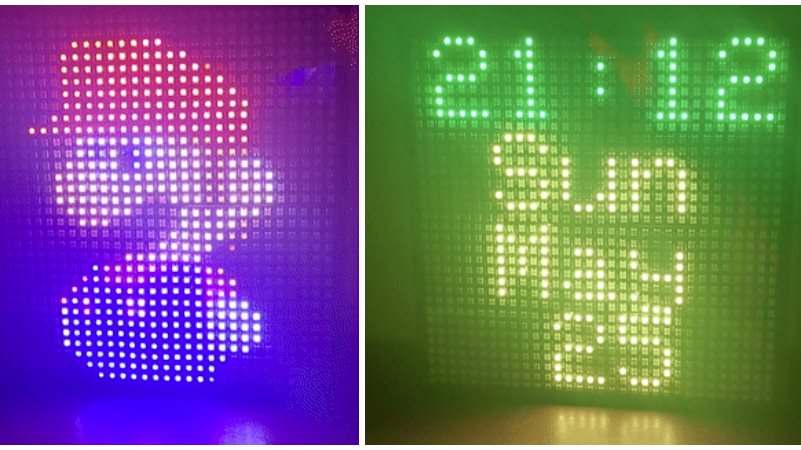
The project behind the idea is a programmable 32 x 32 RGB LED matrix built around addressable LEDs, an ESP8266 microcontroller, and a web interface that lets users upload GIFs for display. Instead of hardcoding one animation and calling it a day, the display becomes a tiny network-connected canvas. Upload a GIF, send animation data, or stream bitmap frames over UDP, and the matrix responds like a very small Times Square that lives in a picture frame.
That is the charm of this build: it is not merely an LED panel; it is an answer to the classic maker problem, “Cool, it lights upnow what?” By making GIF playback easy and on demand, the project turns a homemade display into a flexible visual tool for desks, workshops, dorm rooms, storefront counters, gaming setups, classrooms, and anywhere else that could use a little organized sparkle.
What Makes This LED Matrix “Tidy”?
The word “tidy” matters here. Plenty of LED matrix projects work beautifully but look like a bowl of rainbow spaghetti behind the scenes. This one aims for the opposite: a clean 32 x 32 format, a neat physical frame, a simple upload workflow, and a compact control system. The original build uses WS2812B addressable LEDs arranged into a 32 x 32 matrix and fitted into an off-the-shelf IKEA-style picture frame. That turns a pile of electronics into something closer to wall art than a science fair emergency.
At 32 x 32 pixels, the display has 1,024 individual LEDs. That is low resolution by phone-screen standards, but perfect for pixel art, looping icons, short animations, retro game characters, alerts, logos, emoji-style graphics, and abstract color effects. The low resolution is not a weakness; it is the aesthetic. Every pixel is visible, every motion feels deliberate, and every GIF gets transformed into a chunky little light show.
How a GIF-Ready LED Matrix Works
A GIF-ready LED matrix has three main jobs: receive an animation, interpret the frames, and light the pixels in the correct order at the correct speed. In this project, the ESP8266 acts as the brain. It connects to Wi-Fi, hosts a web interface, accepts uploaded GIF files, and drives the LED matrix so the animation appears on the physical display.
The LED Panel
The panel is built from WS2812B LEDs, a popular type of individually addressable RGB LED. “Individually addressable” means each LED can be told what color to show without requiring separate wiring for every single red, green, and blue channel. That is what makes complex animations practical. Instead of treating the matrix like one big lamp, the controller treats it like a grid of programmable pixels.
The Microcontroller
The ESP8266 is small, inexpensive, Wi-Fi capable, and strong enough for lightweight network-connected LED projects. It is not a supercomputer, so the project has to be smart about file sizes, frame timing, memory, and pixel mapping. But for a 32 x 32 GIF display, it is a natural fit: tiny brain, big personality.
The Web Interface
The best part is the web interface. Instead of recompiling firmware every time you want to swap a dancing banana for a spinning planet, you open a page, upload a GIF, and let the display do its thing. This makes the project friendly for everyday use. A display that requires code edits for every visual change is a developer toy. A display that accepts uploads from a browser becomes something roommates, students, coworkers, or family members can actually enjoy.
Why GIFs Are a Surprisingly Good Fit
GIF is old. Ancient, even. In internet years, GIFs belong in a museum next to dial-up tones and guestbooks. Yet for LED matrices, GIFs still make sense. They are widely supported, easy to create, easy to share, and perfect for short looping animations. A 32 x 32 display does not need cinematic 4K color depth. It needs readable motion, compact files, and simple playback.
Of course, GIFs have limits. Traditional GIFs use a 256-color palette, which means they cannot reproduce every possible shade. On a tiny LED matrix, however, that limit is usually acceptable. The LEDs themselves are bright and bold, and the pixel-art style hides many sins. In fact, limited color can make the final result look more intentional, like an arcade cabinet decided to become home décor.
REST API and UDP Streaming: The Fun Behind the Curtain
The project is not limited to uploading a single animation. It also includes a REST API and low-level UDP bitmap streaming. That matters because it changes the matrix from a passive GIF viewer into a programmable display endpoint.
A REST API makes it easier for other software to control the device. A simple script could change the displayed animation based on the weather, calendar events, server status, music playback, smart-home triggers, or a timer. A UDP bitmap stream opens the door to faster real-time visuals, such as audio-reactive animations, live pixel art tools, or network-driven effects. UDP does not guarantee delivery the way TCP does, but for animation frames, that can be acceptable. If one packet drops, the next frame arrives quickly enough that the audience probably notices nothingunless the audience is a network engineer, in which case they noticed before it happened.
Best Uses for an On-Demand GIF LED Matrix
A tidy GIF LED matrix is one of those devices that seems unnecessary until you own one. Then suddenly everything needs a glowing status icon.
Desk Status Display
Use it to show “busy,” “available,” “recording,” “streaming,” or “do not disturb” animations. Unlike a sticky note, it cannot fall off your monitor and land behind the desk where all lost things go to become dust fossils.
Smart Home Indicator
The matrix can display weather icons, air-quality warnings, doorbell alerts, timer countdowns, or smart-home scenes. A little animated cloud is more fun than checking an app for the seventh time before deciding whether to bring an umbrella.
Maker Workshop Signage
In a workshop, the display can show machine status, print progress, soldering-station warnings, or project names. It gives a bench personality without requiring a full monitor.
Retail and Event Displays
Small stores, craft booths, cafés, and convention tables can use a GIF matrix for animated logos, open/closed signs, sale notices, QR-code prompts, or simple attention-grabbing loops. It is signage with a wink.
Gaming and Streaming Setups
For gamers and streamers, the display can show subscriber alerts, emotes, pixel-art mascots, sound-reactive loops, or scene indicators. It is like a tiny hype person made of LEDs.
Design Choices That Make or Break the Build
The concept is simple, but a reliable LED matrix depends on good decisions. The difference between “delightful glowing art” and “why does my desk smell warm?” often comes down to power, wiring, and software discipline.
Power Supply Matters
A 32 x 32 RGB LED matrix can draw serious current at high brightness, especially if many LEDs are showing white. The original project lists a 5V power supply around 50W, which is a sensible reminder that LEDs are not free magic dots. They are tiny light engines, and they get hungry. A stable 5V supply, proper grounding, and suitable wire thickness are essential for avoiding flicker, color shifts, resets, and dramatic troubleshooting sessions.
Level Shifting Helps Reliability
Many microcontrollers output 3.3V logic, while WS2812B LEDs often expect a 5V data signal. Some builds work without a level shifter, especially over short runs, but a pixel booster or logic-level shifter improves reliability. It is one of those small parts that prevents a large amount of muttering.
Pixel Mapping Must Match the Hardware
LED matrices are not always wired in the same order. Some panels snake left to right, then right to left. Others run in rows, columns, tiles, or mysterious patterns designed by someone who enjoys puzzles. The software has to map each x and y coordinate to the correct LED index. Get that wrong and your cute GIF becomes abstract art. Maybe good abstract artbut still not the cat you uploaded.
Software Lessons from the GIF Matrix World
Modern LED matrix projects benefit from a healthy ecosystem of libraries and examples. Adafruit’s MatrixPortal projects show how approachable RGB matrix GIF playback can be when hardware, storage, and software are packaged well. Arduino’s AnimatedGIF library is designed for microcontrollers and supports playback from RAM, flash, SD cards, and other storage through callbacks. ESP32 HUB75 DMA libraries show another direction, using DMA to drive HUB75 panels at high refresh rates. Raspberry Pi RGB matrix libraries support larger panels, deeper color, and more ambitious installations.
The tidy ESP8266 project sits in a friendly middle zone. It is not trying to be a stadium screen. It is not trying to run a desktop operating system. It is a compact, networked pixel display that does one thing in a charming way: show animated GIFs when asked.
GIF Preparation Tips for Better Results
The fastest way to improve a GIF LED matrix is not always changing code. Often, it is preparing the GIF properly before upload.
Resize to the Native Resolution
A 32 x 32 matrix works best with animations designed or resized for 32 x 32 pixels. If you upload a huge GIF and expect the microcontroller to handle everything gracefully, you may be asking a tiny chip to do a laptop’s job while wearing roller skates.
Use Strong Silhouettes
Simple shapes read better than detailed images. A rocket, heart, face, flame, logo, or game sprite will look better than a full landscape or group photo. LED matrices reward bold design.
Limit Frame Count
Short loops are ideal. A 10-frame bounce, blink, sparkle, or spin often looks better than a long animation with tiny movements. Fewer frames also reduce storage and processing demands.
Choose Contrast Over Subtlety
Subtle gradients can disappear on a bright, low-resolution display. High contrast, clear outlines, and saturated colors usually win.
Why This Project Feels More Useful Than a Normal LED Demo
Many LED projects stop at a rainbow cycle. Nothing against rainbow cyclesthey are the “hello world” of glowing electronics, and they still look great. But a GIF-on-demand matrix moves beyond demo mode. It gives the user control. It lets the display change with the moment.
That flexibility makes it feel alive. Today it can be a clock. Tonight it can be a Halloween ghost. During a livestream, it can show alerts. At a booth, it can display a logo. During a study session, it can show a tomato for a Pomodoro timer. During finals week, it can show a tiny animated dumpster fire, tastefully and accurately.
Practical Build Advice for Beginners
If you are building something similar, start smaller than your ambition. Test one LED strip or one 8 x 8 panel before committing to a full matrix. Confirm your power supply. Confirm your data direction. Confirm your pixel mapping. Then scale up.
Mounting also matters. A frame, diffuser, or translucent acrylic sheet can make the display look more polished. Diffusion softens the harsh LED points and blends colors into a more pleasant image. Too much diffusion, however, can blur the pixels until your crisp alien sprite looks like a haunted avocado. Test before gluing anything permanently.
Ventilation is another quiet hero. LEDs generate heat, and enclosed frames can trap it. You do not need to turn the project into a wind tunnel, but a little airflow and conservative brightness settings can extend component life and improve reliability.
Common Problems and Fixes
The Display Flickers
Check power first. Flicker often points to insufficient current, weak wiring, poor grounding, or voltage drop. Lower the brightness and see if the problem improves. If it does, the LEDs are probably asking for more power than the setup can comfortably provide.
The Animation Looks Scrambled
Review the pixel mapping function. The software may be sending the right colors to the wrong physical LEDs. This is especially common when combining smaller panels into one large matrix.
The First LED Works but the Rest Do Not
Check data direction, solder joints, and signal voltage. Addressable LEDs are picky about receiving clean data. One bad connection can silence everything after it like a tiny glowing traffic jam.
The GIF Plays Too Slowly
Reduce resolution, frame count, file size, or color complexity. Microcontrollers are capable, but they appreciate reasonable workloads. Think of optimization as kindness.
Security and Network Considerations
A web-upload interface is convenient, but any network-connected device deserves basic caution. Keep it on a trusted local network, avoid exposing it directly to the public internet, and use sensible upload limits. A GIF display does not need to become the world’s most colorful attack surface.
If you plan to use the matrix in a public or shared environment, consider adding simple controls: file size limits, accepted file types, a reset option, and perhaps an admin-only upload page. The goal is to let people enjoy the display, not upload a 200MB animation that turns your microcontroller into a philosophical object.
The Bigger Trend: Tiny Displays with Personality
The tidy LED matrix belongs to a larger movement in maker culture: small connected displays that make information feel personal. Instead of relying only on phones, dashboards, and full-size monitors, people are building ambient devices that show just enough information at a glance.
Pixel displays are especially good at this because they simplify. A weather app gives you charts, radar, hourly forecasts, and enough numbers to plan a small expedition. A matrix shows a blue umbrella icon. Sometimes that is all you need.
This is why LED matrices continue to show up in clocks, transit displays, sports scoreboards, shop signs, music visualizers, desk companions, and art installations. They are readable, playful, and flexible. Most importantly, they make technology feel less like a spreadsheet and more like a wink from a robot.
Experience Notes: Living With a GIF LED Matrix
After spending time with GIF-capable LED matrix projects, the biggest surprise is how quickly the display becomes part of the room. At first, it is a project. You stare at the wiring, refresh the upload page, adjust brightness, and celebrate when the first animation appears. Then, a few days later, it becomes furniture with opinions. It sits there glowing quietly, changing the mood of a desk or shelf without demanding attention.
The most enjoyable experience is curating animations. A good matrix GIF is not always the prettiest GIF on a normal screen. It is the one that survives translation into pixels. Simple loops become addictive: a blinking robot, a spinning cube, falling snow, a tiny campfire, a moon phase, a bouncing DVD-style logo, or a progress bar that looks more dramatic than the actual task deserves. The display teaches you to think in silhouettes, loops, and rhythm.
Another lesson is that brightness is emotional. At full brightness, a 32 x 32 LED matrix can feel like it is trying to contact aircraft. That is fun for five minutes and questionable for daily use. Lower brightness often looks better indoors, especially with a diffuser. The colors become less aggressive, the animation feels smoother, and the display stops trying to win an argument with your lamp.
The upload workflow also changes how people interact with the project. When changing animations is easy, everyone wants to participate. Friends suggest memes. Coworkers ask for status icons. Someone inevitably wants a pixel cat. Someone else wants a skull, a flame, or a spinning slice of pizza. The project becomes social because the content is easy to swap.
The most practical use is status messaging. A tiny animated “recording” sign is more noticeable than a text label. A timer animation helps during focused work. A weather icon near the door is genuinely useful. A server-alert animation can be helpful in a home lab. But the most charming uses are pointless in the best way: holiday loops, birthday animations, animated initials, tiny fireworks, and pixel art that exists because glowing squares make people smile.
There are annoyances, of course. GIFs that look great on a laptop can become visual soup. File sizes need discipline. Power wiring deserves respect. Cheap panels may have uneven color or alignment. Wi-Fi setup can be fussy. Debugging pixel order can make you question geometry, electronics, and your life choices. But these are normal maker-project bruises. Once solved, they become the advice you give the next person.
The real reward is that a tidy LED matrix makes digital animation feel physical. A GIF on a phone is disposable. A GIF glowing from a framed matrix feels like an object. It has presence. It casts light on the wall. It becomes part of the environment. That is why this kind of project sticks in the imagination. It takes the internet’s smallest moving pictures and gives them a home made of hardware.
Conclusion
A tidy LED matrix that displays GIFs on demand is more than a clever weekend build. It is a practical example of what happens when approachable hardware, simple networking, and playful visual design meet in one compact frame. The ESP8266 gives it Wi-Fi brains, the WS2812B matrix gives it color and motion, and the web interface makes it easy enough to use without turning every animation swap into a programming assignment.
For makers, it is a satisfying project because it touches hardware, software, design, power management, networking, and user experience. For everyone else, it is simply a delightful little display that can become whatever the moment needs: sign, clock, mascot, alert, decoration, or tiny glowing nonsense machine. And honestly, the world could use more tidy glowing nonsense machines.
Note: This article is written for web publication and is based on real LED matrix project practices, microcontroller display workflows, and commonly used maker hardware concepts.