
FPV, or first-person view flying, has a magical way of turning a grown adult into a kid with a headset, sweaty palms, and the sudden belief that they are Maverick from Top Gun. Then reality lands like a wobbly quadcopter in tall grass: FPV gear can be expensive. Goggles, cameras, receivers, transmitters, batteries, chargers, controllers, flight controllers, antennas, spare props, and mysterious cables with names that sound like rejected Star Wars droids can add up quickly.
That is why the spirit behind the 2022 FPV Contest: A Poor Man’s Journey Into FPV is so refreshing. Instead of treating FPV as a hobby reserved for people with carbon-fiber wallets, this project shows how creativity, patience, and a willingness to look slightly ridiculous can open the cockpit door. JP Gleyzes, an experienced RC enthusiast, explored FPV without immediately buying an expensive drone system. His approach used inexpensive smartphone goggles, 3D-printed adapters, joystick control experiments, and an ESP32-based interface to make FPV more accessible.
The result is not just a clever hardware hack. It is a reminder that the best entry point into FPV is not always the newest digital system or the shiniest ready-to-fly kit. Sometimes it is a magnifier, a phone, a joystick, a power bank, and the confidence to say, “This looks strange, but it might work.” Spoiler: it did.
What Made This FPV Contest Project Stand Out?
The 2022 Hackaday FPV Contest encouraged makers to rethink what first-person flying could be. FPV usually means mounting a small camera on an aircraft, sending live video to goggles or a screen, and piloting as if you are sitting inside the vehicle. For drone racers and freestyle pilots, that means fast turns, tight gaps, and video feeds that must respond quickly. For traditional RC pilots, it can mean a more immersive way to fly planes, wings, cars, boats, or even experimental robots.
JP’s project stood out because it attacked the most intimidating problem for beginners: cost. Instead of starting with a full FPV drone shopping list, he started with things many hobbyists already have. A ready-to-fly drone with smartphone video output? Useful. A phone screen? Useful. A cheap magnifying headset? Surprisingly useful. A 3D printer? Very useful, especially if your idea of fun involves turning household objects into aviation equipment.
The project explored three big ideas: building low-cost FPV goggles, flying RC planes with a joystick in a “captain chair” style setup, and using an ESP32 interface to fly a virtual DJI Avata with an RC radio. Each part solved a practical problem. The goggles made smartphone-based video more immersive. The joystick system made fixed-wing flying feel more like sitting in a real cockpit. The simulator interface helped develop FPV skills without sacrificing a real aircraft to the Tree Gods.
The Cheap FPV Goggles Idea: Weird, Smart, and Surprisingly Practical
Commercial FPV goggles can be excellent, but they are often one of the most expensive pieces of gear in the hobby. Digital systems offer sharp image quality, but they can lock pilots into an ecosystem and raise the cost of entry. Analog systems are usually cheaper and lower latency, but still require goggles, a video receiver, a camera, and a video transmitter. JP’s approach took a different route: use the video return already available on a smartphone.
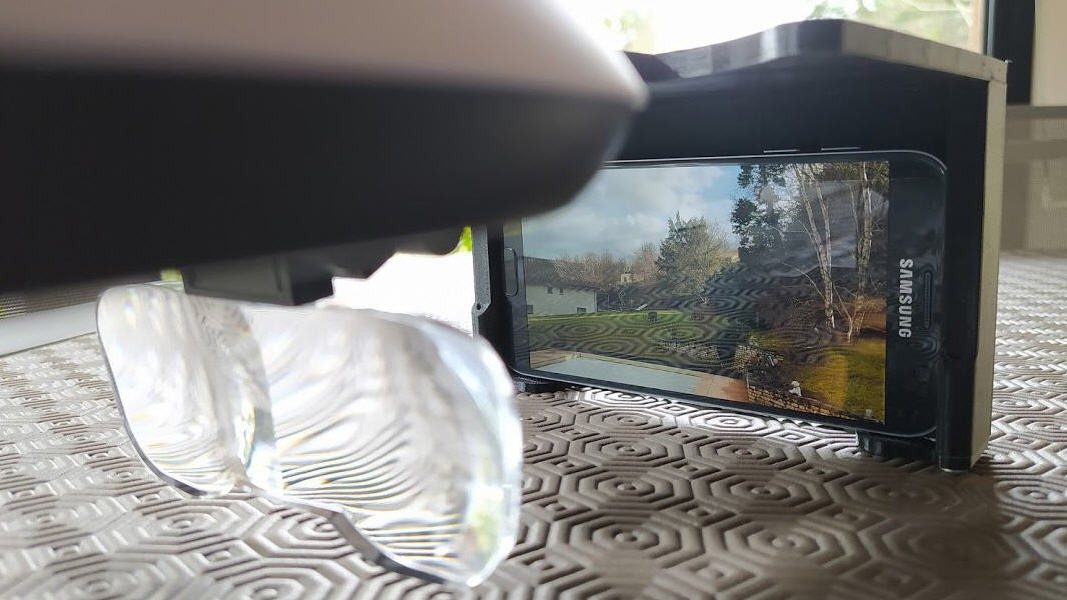
The first attempt involved a headband-style illuminated magnifier. With a 3D-printed adapter, the smartphone could sit in front of the lenses and create a makeshift FPV viewing experience. The image was clear, but there were problems. The phone sat too far from the head, creating uncomfortable torque. Light leaked in from the sides, which reduced immersion. In other words, the idea worked, but the pilot looked like someone trying to repair a watch while being attacked by a tablet.
The second version improved the design using inexpensive AR-style glasses with mirrors set at 45 degrees. This pushed the phone’s optical image forward while keeping the physical phone in a more compact position. JP added light-blocking protection, corrective lenses, 3D-printed snap-on parts, fabric, and magnets. The result was more comfortable, more immersive, and still dramatically cheaper than buying dedicated FPV goggles.
This is the heart of budget FPV: not pretending cheap gear is perfect, but improving it until it becomes useful. You do not need a showroom-ready product to learn. You need something safe, functional, and good enough to help your brain understand the strange joy of flying from the aircraft’s point of view.
Why FPV Feels So Different From Regular RC Flying
Traditional RC flying is usually done line-of-sight. You stand on the ground, look at the aircraft, and control it from an external perspective. That sounds simple until the plane flies toward you and left becomes right, right becomes left, and your brain briefly files a resignation letter.
FPV changes that perspective. Instead of watching the aircraft from the outside, you see what the onboard camera sees. The movement feels more natural to many people because forward is always forward from the aircraft’s perspective. The experience is immersive, almost like shrinking yourself and sitting inside the nose of the plane. Unfortunately, it can also be disorienting, especially for beginners who discover that trees are much closer than they appear in goggles.
That is why a low-cost FPV journey matters. A beginner can experiment before investing deeply. If the sensation makes them dizzy, they have not spent a mortgage payment to learn that their stomach prefers gardening. If they love it, they can upgrade later with a clearer understanding of what they actually need.
The Joystick “Captain Chair” Concept
One of the most charming parts of the project is the joystick control idea. JP had experience flying real planes years earlier and wanted the RC experience to feel more like an aircraft cockpit. Instead of using only a standard RC transmitter, he explored ways to fly with a regular joystick.
Technically, this meant translating joystick inputs into signals an RC system could understand. In RC aircraft, PPM signals have long been used to carry multiple control channels over a single signal stream. By building a Joystick2PPM-style interface, a standard joystick could provide pitch, roll, yaw, and throttle-style inputs to an RC setup. The result is not necessarily the most competitive racing configuration, but that is not the point. The point is immersion.
FPV is emotional as much as technical. The hardware matters, but the feeling matters too. A joystick and a chair can turn an ordinary RC flight into a tiny simulator cockpit. Is it practical for every pilot? No. Is it delightful? Absolutely. Sometimes the best maker projects are not the ones that solve the most urgent problem. They are the ones that make you grin like you just found a secret level in a video game.
ESP32, BLE, and Virtual FPV Practice
The project also used an ESP32 microcontroller to interface an RC radio with virtual flight software. The ESP32 is popular among makers because it is inexpensive, powerful enough for many hobby projects, and includes wireless features such as Bluetooth Low Energy. In this case, the goal was to emulate a gamepad-style controller so an RC radio could be used for FPV simulator practice.
This part of the journey is especially useful because simulators are one of the smartest investments a beginner FPV pilot can make. Real drones crash. Simulated drones also crash, but the only repair bill is emotional. A simulator lets pilots build muscle memory, practice throttle control, learn coordinated turns, and experience acro-style flying without turning carbon fiber into confetti.
Modern FPV pilots often recommend simulator time before real flight. Programs such as VelociDrone, Liftoff, DRL Simulator, Uncrashed, and other FPV training tools allow beginners to practice in different environments. Racing-focused simulators help pilots learn gates, timing, and precision. Freestyle simulators help with flips, rolls, dives, and recovery. The biggest benefit is repetition. You can crash 200 times in a simulator and still have all your propellers.
Analog vs. Digital FPV: The Budget Question
Anyone entering FPV eventually meets the classic debate: analog or digital? Analog FPV systems are generally cheaper, simple, and famous for low latency. The image quality is not glamorous, but it degrades gradually, which can help pilots recognize when signal quality is getting worse. Digital FPV systems usually provide sharper video and a more polished viewing experience, but they cost more and often keep users inside a specific ecosystem.
For a poor man’s FPV journey, analog still makes sense for many builders. It is flexible, parts are widely available, and used gear can reduce costs. However, JP’s smartphone-goggle approach shows a third path: if a drone already sends video to a phone, that phone can become the basis for an improvised FPV display. It will not replace a proper low-latency racing setup, but it can help beginners explore immersion without immediately buying every item in the FPV aisle.
The best choice depends on your goal. Want cinematic flying with a protected cinewhoop? Digital may be worth it. Want cheap racing practice? Analog can be your friend. Want to experiment with a DJI Mavic Mini or Parrot Disco-style aircraft that already has phone video? A homemade viewer might be enough to start. Want to fly through your garage at irresponsible speeds? Please reconsider, or at least move the car first.
Safety: The Part Nobody Should Skip
FPV is fun, but it also changes situational awareness. In the United States, recreational drone pilots are expected to follow FAA rules, including flying for recreational purposes, keeping the aircraft within visual line of sight or using a co-located visual observer in direct communication, giving way to other aircraft, staying at or below authorized altitude limits, taking the TRUST test, and registering drones that require registration. Drones over 0.55 pounds generally need FAA registration, and Remote ID requirements may apply depending on the aircraft and location.
For FPV specifically, a visual observer is not just a bureaucratic decoration. When the pilot is wearing goggles or focused on a screen, someone else should watch the aircraft and the surrounding airspace. That person can warn about people, aircraft, trees, dogs, power lines, and the neighborhood kid who suddenly decides the landing zone is perfect for a scooter parade.
Good FPV safety also includes checking batteries, securing propellers, verifying failsafe behavior, respecting local rules, avoiding crowds, and never flying near airports or controlled airspace without proper authorization. Budget FPV does not mean budget safety. A cheap aircraft can still injure someone or cause property damage if flown carelessly.
What Beginners Can Learn From This Project
1. Start With What You Already Own
Before buying gear, list what you already have. Do you own an RC plane, drone, phone, old controller, joystick, power bank, microcontroller board, or 3D printer? FPV projects often begin with spare parts. The best budget builds are not always cheap because the parts are cheap; they are cheap because the builder reuses existing equipment intelligently.
2. Use Simulation Before Real-World Risk
FPV flying requires muscle memory. Beginners often overcorrect, panic throttle, or forget that gravity has not been patched out of reality. Simulator training reduces those mistakes. A radio connected to a simulator is one of the best low-cost learning tools in the hobby.
3. Upgrade Based on Problems, Not Hype
Do not buy new equipment just because someone online says it is “essential.” Ask what problem you are solving. Is the video too dim? Improve light blocking. Is latency too high for racing? Consider a proper FPV system. Is the headset uncomfortable? Change the mount. Smart upgrades beat emotional shopping carts.
4. Accept That Version One Will Be Ugly
Almost every great maker project starts as a suspicious-looking object on a desk. JP’s first goggles were not perfect, but they proved the concept. The second design fixed real problems. That is engineering: build, test, complain, improve, repeat.
Budget FPV Shopping Priorities
If you are starting from nothing, the most practical budget path is usually a simulator first, then a controller, then a small beginner-friendly FPV aircraft or kit. Tiny whoops are popular for indoor learning because they are light, protected, and less destructive than a five-inch freestyle quad. Ready-to-fly kits can be useful, but quality varies. Research before buying, especially if the kit includes goggles and a radio you may quickly outgrow.
For DIY builders, the core parts of an FPV quad include a frame, flight controller, ESC, motors, propellers, receiver, camera, video transmitter, antenna, battery, and radio controller. Fixed-wing FPV setups can be different, especially when using existing RC aircraft with separate video systems or smartphone-based video links. In both cases, the key is compatibility. A receiver must match the radio protocol. A video transmitter must match the goggles or receiver. Batteries must match the aircraft’s voltage and current needs. Props must match motors. If that sounds like dating advice for electronics, it basically is.
The Real Beauty of “Poor Man’s FPV”
The phrase “poor man’s FPV” is not about celebrating bad equipment. It is about lowering the barrier to discovery. FPV can be intimidating because the vocabulary alone feels like a parts catalog exploded: VTX, RX, FC, ESC, LiPo, PPM, BLE, ELRS, OSD, RTH, BNF, RTF, and on and on. A low-cost project cuts through the fog by focusing on experience. Can I see from the aircraft? Can I control it safely? Can I practice? Can I improve?
JP’s journey proves that FPV is not only a consumer hobby. It is a maker hobby. It rewards problem-solving, experimentation, and personal taste. Some pilots want the cleanest digital image. Others want the fastest lap. Some want cinematic mountain dives. Others want to sit in a homemade captain chair and fly a Parrot Disco with a grin wide enough to cause aerodynamic drag. All of these are valid forms of FPV joy.
Experiences From a Budget FPV Journey
The first experience most budget FPV beginners have is confusion. You open a few tabs, read about goggles, transmitters, receivers, antennas, simulators, batteries, and suddenly you are considering a new hobby: closing tabs. The smart move is to slow down. The poor man’s path is not about buying the cheapest possible gear in one frantic order. It is about learning the system piece by piece.
A great first evening is not a maiden flight. It is connecting a controller to a simulator and learning how throttle behaves. In normal video games, letting go of the stick often stops the action. In FPV acro mode, letting go of the stick does not magically save you. The drone keeps its attitude until you correct it. This is where beginners usually discover that “hovering” is not a default setting; it is a negotiation with physics.
After a few simulator sessions, small improvements become addictive. At first, you crash into every gate. Then you make one gate. Then two. Then you begin turning before the gate instead of after it. Your thumbs stop behaving like nervous squirrels. You learn to manage throttle smoothly instead of treating it like an on/off switch. That is the moment FPV starts to click.
The first homemade headset test is another memorable experience. You strap on a device assembled from a phone, lenses, fabric, printed parts, tape, and optimism. It may look like something a raccoon built after watching a science documentary, but when the image fills your view, the awkwardness disappears. Suddenly the aircraft is not “over there.” It is you. You bank left, the horizon tilts, and your brain whispers, “Oh, this is why people become obsessed.”
Of course, budget setups teach humility. Light leaks matter. Weight matters. A phone mounted too far forward becomes a neck workout sponsored by poor planning. Cheap lenses may distort the edges. Mirrors need alignment. Fabric must block light without making the pilot feel like they are wearing a tiny curtain. Every flaw becomes a lesson, and every lesson makes the next version better.
Real-world flying adds another layer. Even if the video system works, the pilot must manage batteries, wind, signal, orientation, and safety. A visual observer can save the day by spotting hazards outside the camera view. A pre-flight checklist prevents silly mistakes, such as launching with a low battery or forgetting to start recording. FPV rewards preparation. It punishes arrogance with broken propellers and long walks through grass.
The biggest experience, though, is the confidence that comes from making equipment serve your goal. When a homemade interface lets an RC radio control a simulator, or a cheap pair of modified glasses creates an immersive view, the hobby feels less like a shopping competition and more like a workshop adventure. You stop asking, “What do I need to buy?” and start asking, “What can I build with what I have?” That question is powerful. It turns FPV from an expensive doorway into an open garage full of possibilities.
Conclusion
2022 FPV Contest: A Poor Man’s Journey Into FPV is more than a clever contest entry. It is a practical philosophy for anyone who wants to explore first-person view flying without emptying their bank account. By adapting smartphone video, building low-cost goggles, experimenting with joystick controls, and using an ESP32 interface for virtual practice, the project shows that FPV can begin with curiosity rather than cash.
Beginners should take the same lesson to heart: start small, practice in a simulator, follow safety rules, use a visual observer, and upgrade only when a real limitation appears. FPV does not have to begin with premium goggles and a pile of carbon fiber. Sometimes it begins with a magnifier, a phone, and a wonderfully questionable idea that somehow works.
Note: This article is an original, rewritten synthesis based on real FPV contest context, documented DIY FPV project details, current recreational drone safety practices, and widely accepted FPV beginner guidance.