
You found a blog post you actually care about. You have something helpful to add. Andplot twistyou’d like to include a link that backs up your point, shares a resource, or points to a tutorial you swear is not a “Top 47 Secrets Big Gardening Doesn’t Want You to Know.” Totally reasonable.
The only problem? Blog comment sections live in a world where HTML is treated like a raccoon in the kitchen: sometimes it’s allowed, often it’s chased out with a broom, and occasionally it gets trapped in a “moderation queue” for three days.
This guide shows you exactly how to post a blog comment with an embedded link using HTML, what to do when HTML is blocked, and how to avoid looking like comment spam (because nobody wakes up thinking, “Today I will become a cautionary tale.”).
First, a Quick Reality Check: Many Blogs Don’t Allow HTML in Comments
Let’s start with the truth that saves time: lots of blog platforms sanitize (clean) comment content for security and spam prevention. That means your beautiful <a href="..."> link might:
- Get removed entirely
- Show up as plain text (not clickable)
- Be converted into a clickable link automatically (even if you didn’t use HTML)
- Work… but be tagged as user-generated and not counted as a “SEO power link”
None of that is personal. Comment sections have been fighting spam since the early internet days, and the defenses are strong. Your job is to work with the system, not attempt a tiny HTML coup.
Know Your Comment System: WordPress, Disqus, Blogger, and Custom Forms
Before you paste anything, identify what kind of comment system you’re dealing with. Different systems treat links differently:
WordPress (common on U.S. blogs)
WordPress-powered sites typically allow a limited set of HTML tags in comments (varies by site settings and plugins). Many WordPress sites also add attributes like rel="nofollow ugc" to comment links to signal they’re user-generated and not editorial. Translation: your link can still help readers, but it’s not a magic SEO elevator.
Disqus (embedded comments)
Disqus has evolved its editor over time. Some older implementations supported certain HTML formatting tags, but newer editor updates emphasize rich text and Markdown-style features. Many Disqus setups make it easy to insert a hyperlink using the editor UI (a “link” button), rather than raw HTML.
Blogger (Google’s platform)
Blogger comment behavior varies based on settings and templates. Some comments may not render “live” clickable links the way you expect, and some sites restrict formatting. If HTML is blocked, you may need to rely on plain URLs that the platform (or theme) auto-linksor accept that it will remain plain text.
Custom comment forms
Some sites use custom forms, community tools, or membership-based systems. These often allow links only through a designated “Website” field, or they may auto-detect URLs without allowing HTML at all.
The Two Practical Ways to Include a Link in a Blog Comment
Method A: Paste a full URL (works most often)
If the blog auto-links URLs, the simplest approach is best. Just paste the full link:
Many platforms will convert that into a clickable hyperlink automatically. No HTML needed. No drama.
Method B: Use an HTML anchor tag (when allowed)
If the comment box accepts HTML, use the anchor tag:
That’s the basic version. Sometimes you’ll see extra attributes like target and rel. As a commenter, you usually don’t control what the site ultimately outputs (the site may rewrite your link), but here’s a “safe-ish” version that follows modern web conventions:
A few notes:
rel="nofollow"suggests search engines shouldn’t treat it as an endorsement.ugcsignals “user-generated content.”noopenerandnoreferrerare security/privacy-related, especially relevant if a link opens in a new tab.
Method C: Use Markdown-style links (common in modern editors)
Some comment editors accept Markdown even when HTML is blocked. The pattern looks like this:
If your comment system has a formatting toolbar (bold, italic, link icon), it’s often a clue that you should use the UI instead of raw HTML.
Step-by-Step: How to Post a Comment With an Embedded Link (HTML)
Step 1: Read the room (and the comment policy)
Look for cues near the comment form: “No links,” “HTML not allowed,” “Comments moderated,” or “Be respectful.” If a site says “no promotional links,” believe them. Trying anyway is like bringing a foghorn to a library and insisting it’s “for accessibility.”
Step 2: Write the comment firstwithout the link
Your link should support your point, not be your point. Draft a helpful comment that stands on its own. Then add the link where it’s relevant.
Better: “This is a great breakdown of the process. For anyone struggling with the last step, this checklist helped me understand the order of operations: [link]”
Worse: “Nice post! Visit my website!!! [link]”
Step 3: Choose the right link format
- If the blog likely blocks HTML: paste the plain URL.
- If HTML is allowed: use the anchor tag.
- If there’s a link button: use the editor UI.
- If Markdown seems supported: use
[text](url).
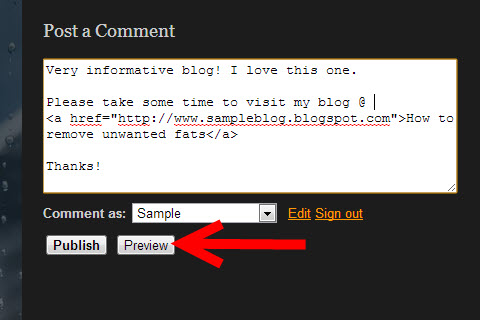
Step 4: Embed the HTML link (when permitted)
Place your anchor tag where it naturally belongs in the sentence. Use descriptive link textsomething a human would want to click.
Example comment (HTML):
Step 5: Avoid “comment spam energy”
The fastest way to get filtered, moderated, or silently deleted is to:
- Use keyword-stuffed anchor text (e.g., “BEST CHEAP INSURANCE USA 2026 CLICK HERE”)
- Drop a link with no context
- Post the same link repeatedly across multiple posts
- Use URL shorteners (many filters dislike them)
- Add multiple links (one is usually plenty)
Step 6: Preview if possible, then submit
Some platforms show a preview. Others don’t. If there’s no preview, submit once and check the posted comment:
- Is the link clickable?
- Did the HTML get stripped?
- Is your comment “awaiting moderation”?
Step 7: If it’s moderated, don’t repost
Reposting the same comment because it hasn’t appeared yet can trigger spam detection. If it says “pending moderation,” that’s your cue to walk away and let the humans do human things.
Why Your Embedded Link Might Not Work (and What to Do Instead)
Problem: The comment shows the HTML literally
If your comment displays <a href="..."> as text, the platform is escaping HTML. Solution: delete the HTML and paste the plain URL.
Problem: The link disappears after you post
The site is likely stripping links to reduce spam. Solution: reference the resource without linking (title + site name), or link only if the blog policy allows.
Problem: The link isn’t clickable (plain text only)
Some templates don’t auto-link URLs. Solution: try including the full URL on its own line, or use the platform’s link tool if available.
Problem: Your comment never appears
It may be caught by spam filters, blocked by moderation rules, or require login/email verification. Solution: reduce promotional language, use fewer links, and make the comment genuinely useful.
Link Etiquette: How to Include a Link Without Being “That Person”
If you want your comment to survive, be the kind of commenter blog owners quietly wish they could clone.
Use one link, max (unless the post explicitly invites resources)
A single, relevant reference link is helpful. Three links looks like you’re trying to sell vitamins out of a trench coat.
Make the link text human and specific
Good link text sets expectations:
- Good: “accessibility checklist”
- Good: “WordPress comment moderation settings”
- Not great: “click here”
- Definitely not: “BEST DEALS NOW”
Don’t promise what your link can’t deliver
If you link to a tool, say it’s a tool. If you link to your own post, disclose that politely:
“I wrote a short walkthrough on this (with screenshots) in case it helps: [link].”
Transparency earns trust. Sneakiness earns filters.
SEO Truth: Comment Links Usually Don’t “Boost Rankings”
If your only reason for commenting is link building, you’re about to have a disappointing day. Many sites label comment links as nofollow and/or UGC, which means search engines may not treat them as editorial votes.
The real value of a link in a comment is typically:
- Helping readers with a relevant reference
- Building credibility in a niche community
- Driving a small amount of qualified referral traffic (when done respectfully)
Think of comment links as “useful citations” more than “SEO shortcuts.” The blogs you admire are trying to protect their communitiesand their rankings.
Security Basics (Yes, Even in a Comment)
Most of the security heavy lifting is done by the website (sanitization, spam filtering, moderation). Still, a few basics help you avoid trouble:
- Use HTTPS links when possible (more trustworthy, fewer browser warnings).
- Avoid sketchy redirects and URL shorteners.
- If you include
target="_blank"in HTML (rarely necessary in comments), pairing withrel="noopener"helps reduce tabnabbing risk. - Never try to add scripts or weird embed code. That’s not “clever,” it’s “banned.”
Bonus: For Blog Owners (Why Your Comment HTML Is Filtered)
If you run a blog and you’re reading this thinking, “So THAT’S what people are trying to do in my comment box,” here’s the behind-the-scenes logic:
- Sites sanitize comments so attackers can’t inject malicious HTML.
- Platforms often allow only a small set of tags (like
<a>,<em>,<strong>) and strip the rest. - Many sites add
relattributes (likenofollowandugc) to comment links to discourage spam and clarify link intent to search engines. - Anti-spam tools and moderation settings exist because bots never sleep and apparently have unlimited free time.
If you want to encourage thoughtful discussion, consider clearly stating your comment rules (including link policies). It reduces confusion and lowers moderation workload.
Conclusion
Posting a blog comment with an embedded link is simple when you know the rules: write a helpful comment first, add a link only where it truly supports your point, and use the format your comment system actually accepts.
When HTML is allowed, the anchor tag is your best friend: <a href="URL">descriptive text</a>. When HTML isn’t allowed, a plain URL (or the editor’s link tool) usually gets the job done.
And if your link gets stripped? Don’t take it personally. Comment sections are security-focused, spam-weary, and slightly haunted. Be useful, be human, and your comment will have a much better chance of sticking around.
Real-World Experiences: What Usually Happens When You Try to Drop a Link in a Comment (And How to Handle It)
Let’s talk about the “real life” side of comment linksthe part nobody mentions until you’ve already posted a thoughtful mini-essay and your link vanishes like it heard a noise downstairs.
One common scenario: you craft the perfect anchor tag, hit Post, refresh… and the comment appears, but the link text is missing. The rest of your sentence is still there, like the site surgically removed the URL and left your grammar to fend for itself. This is usually a spam filter or sanitization rule that strips hyperlinks inside the comment body. In that case, the best move is not to “fight the filter” with more HTML. Instead, re-comment (only if the first comment didn’t post) using a plain URL on its own line, or mention the resource by name: “Search for ‘Example Compression Guide’it explains the file size issue.” It’s less elegant, but more likely to survive.
Another classic: the blog uses a modern editor (often Disqus or a custom community tool). You paste HTML and it shows up literally as text. That’s not the platform being meanit’s the editor treating your input as plain text or Markdown. The moment you see <a href= printed in public, just accept the L and switch to the editor’s link button or the Markdown link format. If there’s a toolbar, it’s basically the system whispering, “We have a process. Please stop bringing raw HTML to a UI fight.”
Then there’s moderation limbo. You post a helpful comment with a single, relevant link, and it doesn’t appear. No error message. No confirmation. Just… silence. Many sites hold comments with links for review, even when the content is great, because spam bots also love links. If the site says “awaiting moderation,” take that at face value. Reposting repeatedly can make things worse because it looks automated. If you absolutely must follow up, wait a reasonable amount of time and, if the site has a contact form, send a short note: “Hi, I left a comment with a resource linkjust checking if it’s stuck in moderation.” Keep it calm. Blog owners are juggling real life, not running a 24/7 comment hotline.
You might also run into “link looks live to me, but nobody else can click it.” This happens when the platform doesn’t auto-link in the comment display, or when the theme’s CSS/JavaScript interferes with clickable elements. As a commenter, you can’t fix their theme. The workaround is to paste the full URL with the https:// included and place it on its own line. Some auto-linkers only detect URLs when they’re clearly separated.
Finally, there’s the social reality: even when links are allowed, readers can smell self-promotion from a mile away. The comments that earn respect are the ones where the link is a “footnote,” not a sales pitch. If your link is to your own content, the best experience you can create is honesty plus value: “I wrote a short guide with screenshotshope it helps.” People don’t mind creators. They mind ambushes.
Bottom line: successful link-sharing in comments is less about HTML wizardry and more about matching the platform’s rules, respecting the community, and making your link feel like a helpful referencenot a trap door into someone’s funnel.