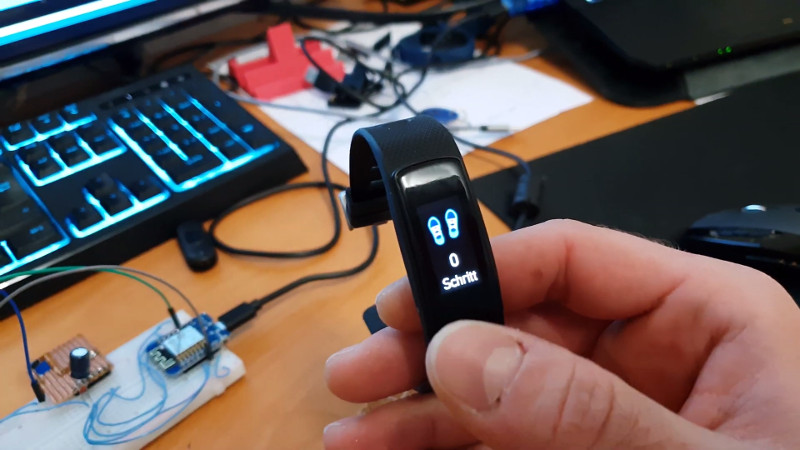

Cheap fitness trackers are tiny miracles wrapped in silicone. For the price of a pizza night, they can count steps, blink notifications, measure heart rate, buzz like an angry mosquito, and remind you that you have been sitting still long enough to legally qualify as furniture. But behind the cheerful little screen is something many users never think about: firmware.
Firmware is the low-level software that tells the tracker what to do. It controls the display, sensors, Bluetooth connection, battery behavior, button input, vibration motor, and sometimes even the way health data is stored or shared. When that firmware is locked down, the user gets whatever the manufacturer shipped. When it is open, modified, or replaced, the device becomes something far more interesting.
That is where custom firmware for cheap fitness trackers comes in. It is part electronics hobby, part privacy experiment, part rescue mission for forgotten gadgets, and part “what happens if I press this?” science. From reverse-engineered bargain bands to open-source smartwatches like PineTime and Bangle.js, custom firmware has turned basic wearables into playgrounds for developers, privacy-minded users, and tinkerers who believe a $20 wristband should not need a cloud account just to tell time.
What Is Custom Firmware for Fitness Trackers?
Custom firmware is replacement or modified software installed directly on a device. In the case of a fitness tracker, it can change how the tracker boots, connects through Bluetooth Low Energy, reads sensors, displays menus, stores activity logs, and communicates with companion apps.
Unlike ordinary mobile apps, firmware lives on the tracker itself. That means it has direct control over the hardware. If the original software is the factory tour guide, custom firmware is the person who found the maintenance door and brought a flashlight.
Common reasons people install custom firmware
People experiment with custom wearable firmware for several practical reasons:
- Privacy: Avoiding vendor apps that require accounts, cloud sync, or excessive permissions.
- Longevity: Keeping older fitness bands useful after official app support disappears.
- Customization: Adding new watch faces, menus, notifications, or sensor behavior.
- Learning: Exploring Bluetooth, embedded C, Arduino, Zephyr, JavaScript, or real-time operating systems.
- Repair culture: Reducing e-waste by making inexpensive hardware useful again.
In other words, custom firmware is not only about hacking gadgets for bragging rights. It can also be a practical answer to abandoned software, limited features, and the modern problem of needing five apps, three logins, and a blood oath just to see your step count.
Why Cheap Fitness Trackers Are So Hackable
Budget fitness trackers are often built from common parts. Many use Bluetooth Low Energy chips, compact displays, accelerometers, heart-rate sensors, flash memory, and rechargeable lithium batteries. Some models use chips from families such as Nordic Semiconductor’s nRF52 line, which are popular in low-power connected devices because they combine a microcontroller and Bluetooth radio in one package.
This hardware similarity matters. If developers can understand one device, they may be able to apply some of that knowledge to related models. That does not mean every cheap band is easy to reprogram. Some have locked bootloaders, unknown display drivers, encrypted firmware, or hardware revisions that change without warning. The outside may look identical while the inside has gone on a surprise vacation.
Still, cheap trackers are attractive targets because they are affordable, widely available, and low risk for experimentation. Accidentally bricking a $15 band is sad. Accidentally bricking a $700 smartwatch is a tiny financial opera.
Real Examples of Custom Firmware Projects
ATC1441 and low-cost tracker firmware
One of the best-known examples in the hobbyist world came from reverse-engineering work on inexpensive D6-style fitness trackers. Developer Aaron Christophel, known online as ATC1441, explored custom firmware for these cheap wearables and shared projects that helped others understand how such devices could be repurposed.
These efforts showed that even simple fitness bands can contain surprisingly capable hardware. With custom code, a tracker can become more than a factory step counter. It can display custom screens, communicate differently, or serve as a platform for learning embedded programming. Of course, this requires patience. You may begin with noble goals and end three hours later yelling at a tiny ribbon cable. This is normal. The cable started it.
Gadgetbridge: freedom from vendor apps
Not all wearable freedom requires flashing new firmware. Sometimes the better move is replacing the phone app. Gadgetbridge is a free and open-source Android application that supports many smartwatches, bands, headphones, and other Bluetooth devices without requiring the original vendor app.
For privacy-focused users, this is a major advantage. Many fitness tracker apps want accounts, cloud sync, location access, contact permissions, and analytics. Gadgetbridge offers an alternative model: pair the device locally, keep data on the phone, and avoid unnecessary vendor dependence when supported. It is not magic, and compatibility varies by model, but it is one of the most important tools in the open wearable ecosystem.
PineTime and InfiniTime
PineTime is an inexpensive smartwatch designed with open-source software in mind. Its best-known firmware, InfiniTime, is a fast open-source project written in modern C++. It supports core smartwatch features such as notifications, alarms, timers, step counting, heart-rate monitoring, and watch faces.
PineTime is important because it shows what happens when the hardware is intentionally friendly to open firmware. Instead of fighting the device, developers can build on it. That makes it a better learning platform than many mystery-brand trackers, where half the challenge is discovering which chip is under the glue blob.
Bangle.js and JavaScript on the wrist
Bangle.js takes a different approach. It is an open, hackable smartwatch powered by Espruino, allowing users to write and install apps using JavaScript. It includes features such as Bluetooth Low Energy, GPS, accelerometer, heart-rate monitoring, and a web-based app loader.
For beginners, Bangle.js is appealing because it lowers the barrier to entry. You do not necessarily need to start with soldering wires to test pads or compiling embedded C. You can write small apps, upload them wirelessly, and learn how wearable devices behave in the real world. It is like a coding sandbox, except the sandbox counts your steps and occasionally tells you your heart is still participating.
How Custom Firmware Works Behind the Scenes
Installing custom firmware usually involves three major steps: understanding the hardware, gaining access to the firmware update path, and flashing new code safely.
1. Identifying the hardware
The first task is figuring out what is inside the tracker. Developers look for the main microcontroller, display controller, accelerometer, heart-rate sensor, battery management chip, flash memory, and Bluetooth capabilities. This can involve opening the device, reading markings on chips, checking FCC-style documentation when available, scanning Bluetooth characteristics, or comparing the tracker to known models.
2. Understanding communication
Fitness trackers usually communicate with phones through Bluetooth Low Energy. Developers may inspect BLE services and characteristics to learn how the official app sends commands, receives step data, updates time, pushes notifications, or triggers firmware upgrades.
This is where open tools and patience matter. BLE is designed for low power, not for making human beings feel emotionally stable. A single device may advertise one name, pair under another, and expose characteristics that look like someone named them by falling asleep on a keyboard.
3. Flashing the firmware
Flashing means writing new firmware to the device’s memory. Depending on the tracker, this may happen through a debug interface such as SWD, through a bootloader, or through an over-the-air update process. Some devices are friendly. Others are locked, encrypted, or require vendor-specific activation.
The safest projects provide clear documentation, recovery steps, and tested firmware images. The riskiest method is downloading a random binary from a forum post titled “works maybe.” That is not a firmware strategy. That is a wrist-based lottery ticket.
Benefits of Custom Firmware for Cheap Fitness Trackers
Better privacy control
Wearables collect intimate data: movement patterns, sleep habits, heart-rate trends, location-related activity, and daily routines. Custom firmware and open companion apps can reduce dependence on cloud platforms and limit unnecessary data sharing. This matters because fitness and health apps do not always fall under the same protections people associate with medical records.
More useful features
Custom firmware can add watch faces, alternate menus, better notification handling, alarms, timers, experimental sensor modes, or data export options. On open platforms, users can also build niche features that commercial manufacturers would never prioritize, such as custom vibration patterns, offline logging, or nerdy status screens that display battery voltage because joy is personal.
Longer device lifespan
Cheap trackers often become useless when the vendor app disappears or stops supporting older models. Open-source firmware and apps can keep hardware alive longer. This reduces waste and gives users more control over devices they already bought.
Education and skill building
A fitness tracker is a compact embedded systems classroom. It teaches Bluetooth, power management, sensor fusion, display control, memory limits, firmware updates, debugging, and user interface design. Unlike a generic development board, it also has a real enclosure, battery, screen, and purpose. That makes success feel satisfying and failure feel educational, which is a polite way of saying “bring snacks.”
Risks and Limitations You Should Know
You can brick the device
Bricking means the tracker stops functioning, usually because firmware flashing failed or the wrong image was installed. Some devices can be recovered with debug tools. Others become decorative wrist pebbles.
Health data may be less accurate
Commercial wearable companies often use proprietary algorithms to estimate steps, sleep, calories, and heart rate. Custom firmware may access raw sensors but not reproduce the same algorithmic refinement. That means results can be useful for experimentation but should not be treated as medical-grade data.
Battery life can suffer
Good firmware spends most of its life doing almost nothing. That is a compliment. Low-power wearables rely on careful sleep modes, efficient Bluetooth intervals, display timing, and sensor scheduling. A small coding mistake can drain a battery quickly. If your tracker used to last seven days and now lasts seven hours, congratulations: you invented a wrist heater.
Legal and warranty concerns
Installing custom firmware can void warranties and may affect regulatory compliance if radio behavior is changed improperly. Most hobby projects focus on personal experimentation, not commercial redistribution. Users should avoid modifying radio power, frequency behavior, or anything that could violate communications rules.
Best Devices for Beginners
For beginners, the best device is not always the cheapest tracker online. The best device is the one with documentation, community support, and a realistic recovery path.
Good starting options
- PineTime: Excellent for learning open smartwatch firmware through InfiniTime and related projects.
- Bangle.js 2: Beginner-friendly for app development, especially for users comfortable with JavaScript.
- Gadgetbridge-supported bands: Useful for people who want more privacy without flashing firmware.
- Known ATC1441-compatible devices: Interesting for advanced tinkerers who want to explore reverse engineering.
If your goal is simply to avoid a manufacturer’s cloud app, start with Gadgetbridge compatibility. If your goal is firmware development, choose PineTime or Bangle.js. If your goal is to learn reverse engineering, buy two cheap trackers: one to experiment with and one to apologize to.
Basic Safety Checklist Before Flashing
- Confirm the exact device model and hardware revision.
- Read the project documentation from start to finish before touching the device.
- Check whether recovery is possible if flashing fails.
- Back up the original firmware if the project supports it.
- Use trusted firmware builds from active repositories.
- Charge the tracker fully before flashing.
- Do not flash firmware meant for a similar-looking but different device.
The final point deserves a spotlight. Cheap electronics often share cases while changing internal parts. Two trackers can look identical and have completely different chips. The outside says “same product.” The circuit board says “plot twist.”
Privacy: The Quiet Reason This Topic Matters
Fitness trackers are often marketed as wellness gadgets, but they are also data collectors. A tracker may know when you sleep, when you wake, when you exercise, when your heart rate spikes, and when you mysteriously walk 600 steps at midnight because you remembered the laundry.
Many users are becoming more aware of where that data goes. Open-source firmware and companion apps provide a different philosophy: the device should serve the user first. That does not automatically make every open project secure, but transparency gives users and developers the chance to inspect behavior, fix problems, and reduce unnecessary data exposure.
For people who care about privacy, the ideal setup is simple: collect only what is needed, store it locally when possible, sync only when chosen, and avoid accounts that exist mainly to feed dashboards nobody asked for.
The Future of Open Wearables
The future of custom firmware for cheap fitness trackers will likely move in two directions. First, more open platforms will make wearable development easier. PineTime and Bangle.js already show that affordable devices can be designed for experimentation rather than locked down after purchase.
Second, privacy pressure may push more users toward local-first wearable tools. As people learn how much personal data fitness apps can collect, alternatives like Gadgetbridge become more attractive. A watch that counts steps without phoning home should not feel revolutionary, but here we are, living in the timeline where “works offline” sounds like a luxury feature.
There will still be challenges. Hardware changes quickly. Cheap manufacturers may not publish documentation. Bluetooth stacks are complex. Sensor algorithms are hard. But the community has already proven that small devices can have big second lives when curious people refuse to accept “unsupported” as the final answer.
Experience Notes: What It Feels Like to Work With Custom Fitness Tracker Firmware
Working with custom firmware for cheap fitness trackers is rewarding, but it is not always smooth. The first lesson is that tiny devices have tiny margins for error. A desktop computer gives you a keyboard, monitor, logs, and plenty of storage. A tracker gives you a button, a screen the size of a postage stamp, and the emotional support of a blinking Bluetooth icon.
The most enjoyable part is the moment a device responds to your own code. Maybe it displays a custom message. Maybe the vibration motor buzzes on command. Maybe the step counter finally appears in an open app instead of a mysterious vendor dashboard. That small success feels huge because you are controlling hardware that was never designed to explain itself.
The most frustrating part is uncertainty. Cheap trackers often ship with multiple hardware revisions under the same product name. A guide may say the device uses one chip, while your unit contains another. A firmware image may work perfectly for one person and fail for another because the screen driver changed. This is why community notes, photos, issue threads, and careful documentation are so valuable.
Battery tuning is another humbling experience. Beginners often write firmware that works while forgetting that wearables must sleep aggressively. A tracker that updates the display too often, scans Bluetooth too frequently, or polls sensors without restraint will drain fast. Good wearable firmware behaves like a cat: alert when necessary, asleep whenever possible, and deeply offended by waste.
Another practical lesson is that open-source wearable work sits between software and hardware. You may need to read code, inspect circuit boards, understand BLE behavior, test mobile apps, and sometimes solder tiny pads. It helps to move slowly. Keep notes. Take photos before disassembly. Label files clearly. Do not trust your memory at 1:00 a.m.; your memory thinks “final_final_really_final.bin” is a good filename.
For non-developers, the best experience may come from using open companion apps rather than flashing firmware. Gadgetbridge, for example, can make supported devices more private and independent without requiring users to rewrite the tracker itself. This is a sensible middle path: you gain control without turning your desk into a rescue clinic for bricked wristbands.
For developers, open devices like PineTime and Bangle.js are more satisfying than mystery trackers because they reduce guesswork. Documentation, active communities, and recovery options make experimentation less stressful. You can focus on building features instead of decoding whether a charging cable is secretly also a programming cable.
The biggest takeaway is that custom firmware changes your relationship with devices. A cheap tracker stops being disposable and becomes understandable. Even when the project fails, you learn how modern wearables work: sensors, radio, firmware, privacy, power management, and the fragile magic of making a tiny computer live on your wrist for a week.
Conclusion
Custom firmware for cheap fitness trackers is more than a hobbyist trick. It is a practical movement toward privacy, repairability, learning, and user control. Whether you are flashing a bargain band, testing InfiniTime on PineTime, writing JavaScript for Bangle.js, or simply pairing a supported watch with Gadgetbridge, the goal is the same: make the device serve you, not the other way around.
For beginners, the smartest path is to start with well-documented projects and avoid random firmware files. For privacy-minded users, open companion apps may offer the biggest benefit with the least risk. For embedded developers, cheap fitness trackers provide a compact and surprisingly rich platform for learning real-world firmware design.
The tiny screen may be humble, but the idea is powerful. When users can inspect, modify, repair, and extend their own devices, even a cheap fitness tracker becomes something better than disposable tech. It becomes yours.