
Imagine controlling your laptop presentation, smart TV, music player, robot, or DIY home automation gadget with a tiny remote that understands a flick of your wrist. No oversized plastic wand. No mystery drawer full of dead batteries. No frantic button mashing while your device stares back like it has chosen silence as a lifestyle. That is the promise of a compact, gesture-based remote control over Bluetooth: a small wireless controller that converts hand motion into digital commands.
At its simplest, this kind of remote combines three ideas: motion sensing, gesture recognition, and Bluetooth communication. A sensor inside the device detects movement. A microcontroller decides whether that movement means “next slide,” “volume up,” “pause,” “scroll,” or another command. Then Bluetooth sends that command to a host device such as a computer, phone, tablet, smart display, media box, or embedded system.
The result feels almost magical, but the technology is very real. Bluetooth Low Energy, commonly called BLE, is widely used in small battery-powered devices because it can transfer short bursts of data without draining power like an overexcited flashlight. Human Interface Device support, often implemented through HID over GATT, allows Bluetooth accessories to behave like keyboards, mice, media remotes, or game controllers. Add a six-axis IMU sensor, a compact circuit board, and smart firmware, and you have a remote that responds to movement instead of relying only on buttons.
What Is a Compact, Gesture-Based Bluetooth Remote?
A compact, gesture-based Bluetooth remote is a small wireless input device that uses hand movements as commands. Instead of pressing a physical button for every action, the user performs gestures such as tilting left, tilting right, rotating, tapping the air, shaking, swiping, or pointing. The remote interprets those gestures and sends control signals through Bluetooth.
Think of it as the tiny cousin of a game controller, the smarter sibling of a TV remote, and the more polite version of yelling at your speaker from across the room. It can be worn on a finger, held like a pebble, clipped to a keychain, embedded into a presentation clicker, or built into a wearable band.
Common Uses
Gesture-based Bluetooth remotes are useful in many situations where buttons are inconvenient, slow, or too bulky. A presenter can flick a wrist to move to the next slide. A maker can control a robot with hand motion. A media user can pause music or adjust volume without looking down. A smart home enthusiast can trigger scenes with simple gestures. A developer can build accessibility-friendly input tools for users who prefer motion-based controls.
The best part is that these remotes do not need to be large. Modern microcontrollers, Bluetooth chips, and IMU sensors are tiny enough to fit into devices powered by coin-cell or rechargeable lithium batteries. That opens the door to pocketable, wearable, and even ring-sized designs.
How the Technology Works
A gesture-based Bluetooth remote may feel futuristic, but its basic workflow is straightforward. Motion enters through a sensor, software interprets the motion, and Bluetooth sends the result.
1. The IMU Detects Movement
Most gesture remotes use an inertial measurement unit, or IMU. A typical six-axis IMU includes a three-axis accelerometer and a three-axis gyroscope. The accelerometer senses changes in linear movement and orientation, while the gyroscope measures rotation. Together, they help the remote understand whether it is being tilted, waved, rotated, tapped, or shaken.
For example, tilting the device sharply to the right might be mapped to “next track.” A quick upward flick might mean “volume up.” A small circular motion could trigger “scroll.” The sensor data itself is just numbers, but firmware turns those numbers into meaning.
2. The Microcontroller Interprets Gestures
The microcontroller is the brain of the remote. It reads sensor data, filters noise, identifies patterns, and decides what command to send. Some projects use simple threshold logic. For instance, if acceleration on one axis passes a certain value, the firmware recognizes a swipe. Other designs use machine learning models trained to classify multiple gestures more accurately.
Threshold logic is easier to build and debug. Machine learning can recognize more natural gestures, but it requires training data, model optimization, and careful testing. A compact remote should avoid false positives, because nobody wants their music skipping tracks every time they reach for popcorn.
3. Bluetooth Sends the Command
Once the remote identifies a gesture, it sends a command over Bluetooth. For many control tasks, BLE HID is the most practical approach because the receiving device can treat the remote like a standard input accessory. A computer may recognize it as a keyboard, mouse, media controller, joystick, or consumer control device.
This is why a gesture remote can control slides, media playback, volume, scrolling, or pointer movement without requiring a custom app in every case. When implemented correctly, HID support lets the device “speak a language” that operating systems already understand.
Why Bluetooth Low Energy Is a Great Fit
Bluetooth Low Energy is well suited for a compact gesture remote because the remote usually sends small, occasional packets of data. It does not stream video or move huge files. It simply says, “Hey, host device, that gesture means next slide.” BLE is built for this kind of short-range, low-power communication.
Battery Efficiency
A compact remote has limited space for batteries, so power management matters. BLE allows devices to sleep when idle, wake when needed, advertise for connections, send data, and return to low-power states. The firmware can also reduce power use by lowering sensor sample rates, turning off unused peripherals, and avoiding constant radio activity.
Broad Compatibility
Bluetooth is supported by modern laptops, smartphones, tablets, streaming devices, and many embedded boards. HID-style Bluetooth devices are especially attractive because they can often work without special drivers. That makes the remote easier to use across Windows, macOS, Android, iOS, Linux, and other platforms, although exact behavior may vary depending on the host and the HID reports used.
Small Hardware Footprint
BLE system-on-chip modules combine radio hardware and microcontroller functionality in compact packages. Boards based on Nordic Semiconductor, Espressif, Silicon Labs, Adafruit, Arduino-compatible platforms, and other ecosystems make prototyping far more approachable than building a wireless stack from scratch. Translation: you can spend more time designing the remote and less time staring at radio documentation like it owes you money.
Core Components of a Gesture-Based Bluetooth Remote
A practical gesture remote does not need many parts, but each part has an important job.
Microcontroller With Bluetooth
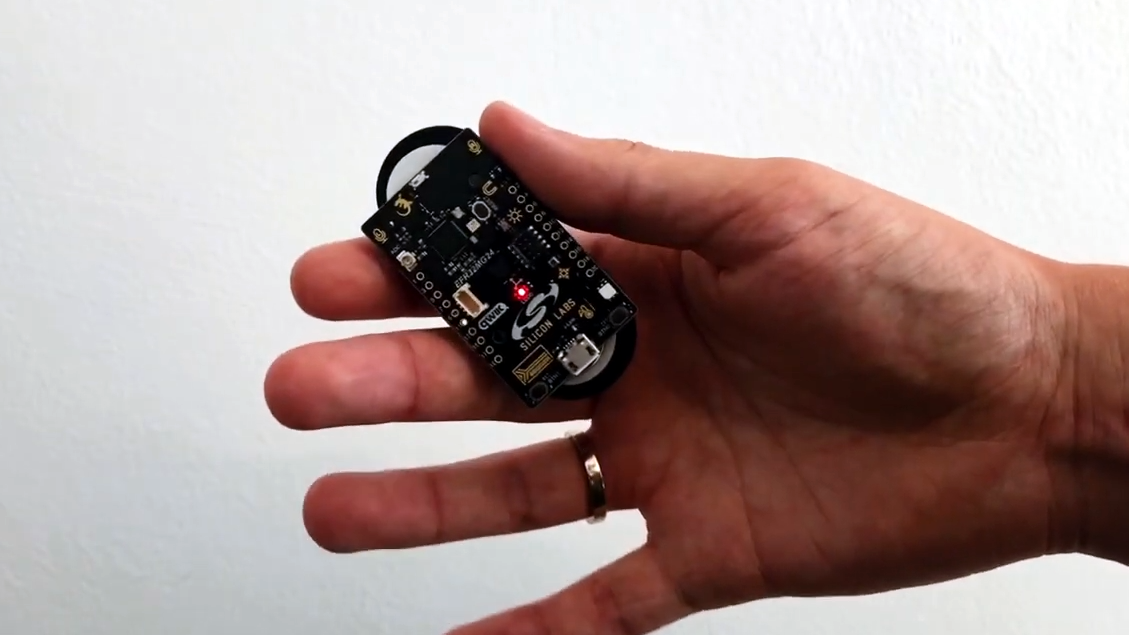
The microcontroller handles sensor reading, gesture processing, Bluetooth communication, and power management. Popular choices include BLE-capable development boards and modules such as nRF52-based boards, ESP32 variants, Silicon Labs wireless SoCs, and Arduino-compatible BLE boards. The right choice depends on power requirements, firmware ecosystem, size, cost, and HID support.
Motion Sensor
A six-axis IMU is the usual starting point. For basic tilt gestures, an accelerometer alone may work. For more advanced pointing, rotation, air-mouse behavior, or gesture classification, a gyroscope improves accuracy. Some modern IMUs include embedded features for gesture detection, sensor fusion, or low-power motion processing.
Power Source
Compact remotes often use a coin-cell battery, a small lithium-polymer battery, or a rechargeable module. Coin cells are thin and simple, but they have limited current capacity. Rechargeable batteries can support more demanding features, but they require charging circuitry and space. A truly compact design must balance battery life, size, and user convenience.
Buttons, LEDs, and Haptics
Even a gesture remote can benefit from one or two buttons. A power button, pairing button, or mode switch can prevent confusion. LEDs can show pairing status, low battery, or gesture recognition feedback. A tiny vibration motor can confirm actions without requiring the user to look at the device.
Enclosure
The enclosure affects comfort, durability, and gesture accuracy. A remote held between fingers may need a grippy surface. A wearable design needs secure attachment. A presentation controller should be easy to orient by touch. If users cannot tell which way is forward, the remote becomes a very small source of very large frustration.
Designing Gestures That Actually Work
The biggest mistake in gesture control is assuming every motion will be obvious to both humans and sensors. Human gestures are messy. People move at different speeds, hold devices at different angles, and perform the same gesture slightly differently every time. Good gesture design starts with simplicity.
Use Distinct Gestures
Gestures should be easy to distinguish. “Tilt left” and “tilt right” are clearer than two nearly identical diagonal flicks. “Double tap” and “long hold” can be useful if the sensor and firmware support them reliably. Avoid gestures that overlap too much, especially if the remote is meant for casual users.
Limit the Number of Commands
A compact remote should not try to replace an entire keyboard through interpretive dance. Four to eight reliable gestures are often better than twenty unreliable ones. Common command sets include next, previous, play or pause, volume up, volume down, scroll, select, and back.
Add Confirmation
Feedback helps users trust the device. A small LED blink, haptic buzz, or on-screen response confirms that the gesture was recognized. Without feedback, users may repeat gestures too aggressively, which can lead to duplicate commands. That is how “next slide” becomes “welcome to slide 47.”
Include a Neutral Zone
The firmware should ignore small accidental movements. A neutral zone prevents the remote from triggering commands while being picked up, pocketed, or adjusted in the hand. This is especially important for wearable designs.
Bluetooth HID vs. Custom BLE Services
One of the most important design decisions is whether the remote should act as a standard HID device or use a custom BLE service.
Bluetooth HID
HID is ideal when the remote needs to control common device functions. Keyboard shortcuts, media keys, mouse movement, and gamepad-style input can be handled through HID reports. A presentation remote might send right-arrow and left-arrow key events. A media remote might send play, pause, volume, and track controls.
The main advantage is compatibility. The host device may not need a custom app. The main challenge is that HID report descriptors must be built correctly, and different platforms may handle certain controls differently.
Custom BLE Services
A custom BLE service is useful when the remote controls a dedicated app, robot, IoT device, or experimental system. Instead of pretending to be a keyboard or mouse, the remote sends custom data such as gesture IDs, sensor values, battery status, or mode settings.
This approach offers flexibility, but it usually requires software on the receiving side. For example, a mobile app may scan for the remote, connect to it, subscribe to notifications, and translate gesture data into app actions.
Real-World Examples and Inspiration
Several maker and engineering projects have demonstrated the practicality of compact Bluetooth gesture control. DIY builds often use BLE development boards with IMU sensors to detect wrist motion and send commands to a computer. Some projects classify a set of gestures with a lightweight machine learning model running directly on the device. Others use simpler motion thresholds to create an air mouse, media controller, or slide clicker.
Commercial smart remotes and reference designs also show where the idea can go. Advanced Bluetooth remotes for TVs and media centers may combine buttons, motion sensing, voice input, and ultra-low-power design. In the maker world, boards from Adafruit, SparkFun, Arduino-compatible ecosystems, Espressif, Nordic-based platforms, and Silicon Labs development kits make it possible to prototype similar ideas without a full hardware lab.
The common pattern is clear: compact hardware, motion sensing, efficient wireless communication, and firmware that keeps the user experience simple. The device does not need to look complicated. In fact, the best version may look boring on the outside while doing clever work inside.
Building a Prototype: A Practical Roadmap
If you wanted to build a compact, gesture-based Bluetooth remote, the project could be broken into manageable stages.
Stage 1: Choose the Control Goal
Start with one use case. A presentation clicker is easier than a universal smart home controller. A media remote is easier than a full air mouse. Define exactly what the gestures should control before choosing hardware.
Stage 2: Select the Board and Sensor
Choose a BLE-capable board with good documentation and library support. Pair it with a six-axis IMU breakout or use a development kit that already includes motion sensing. For a first prototype, ease of programming is more important than the smallest possible size.
Stage 3: Read Raw Motion Data
Before recognizing gestures, display accelerometer and gyroscope readings. Move the device and observe how the data changes. This step teaches you what your sensor actually sees, not what your imagination hopes it sees.
Stage 4: Define Gesture Rules
Create simple rules for a few gestures. For example, a quick positive acceleration on the X-axis could mean right swipe. A quick negative movement could mean left swipe. A sustained upward tilt could mean volume up. Test each rule repeatedly and adjust thresholds.
Stage 5: Add Bluetooth Output
Implement BLE HID if the goal is to control a computer or phone using common input commands. For a custom device, create a BLE service that sends gesture IDs. Keep the first command set small and reliable.
Stage 6: Improve Power and Usability
Add sleep modes, a pairing routine, a battery indicator, and a way to prevent accidental commands. Test the remote in real situations: walking around a room, presenting slides, sitting on a couch, or controlling a project from several feet away.
Common Challenges
Gesture-based Bluetooth remotes are fun to build, but they come with real engineering challenges.
False Positives
The remote may recognize a gesture when the user simply picks it up. This can be reduced with better thresholds, gesture timing windows, a lock button, or a requirement that gestures begin from a stable state.
Latency
The delay between gesture and response should feel instant. Latency can come from sensor sampling, gesture processing, BLE connection intervals, host behavior, or power-saving settings. For a remote, responsiveness matters more than sending lots of data.
Pairing and Reconnection
Users expect Bluetooth devices to reconnect without drama. The firmware should handle bonding, advertising, connection loss, and sleep recovery gracefully. A remote that works beautifully only after five pairing attempts is not charming; it is a tiny wireless puzzle box.
Cross-Platform Differences
A HID command that works on one platform may behave differently on another. Media keys, keyboard shortcuts, mouse movement, and gamepad inputs can vary. Testing across target devices is essential.
Battery Life
High sensor sample rates and constant radio activity can drain a small battery. A good design samples intelligently, sleeps aggressively, and wakes quickly. Battery life is not an afterthought; it is part of the product experience.
SEO-Friendly Buying or Development Considerations
Whether you are developing a product, planning a maker project, or evaluating a compact Bluetooth gesture remote, focus on the practical details.
Look for Reliable BLE HID Support
If the remote needs to control laptops, phones, or media devices, BLE HID support is a major advantage. It can reduce the need for custom host software and make the remote feel plug-and-play.
Prioritize Comfortable Gesture Design
Small does not automatically mean usable. The best compact gesture remote should be easy to hold, easy to orient, and forgiving of natural hand variation.
Check Battery Strategy
A remote that requires constant charging may not feel convenient. Look for low-power components, sleep modes, and a realistic estimate of battery life under normal use.
Think About Accessibility
Gesture control can help some users, but it can also create barriers if gestures require precise movement. A thoughtful design includes adjustable sensitivity, optional buttons, and clear feedback.
Future of Gesture-Based Bluetooth Control
The future of compact gesture remotes points toward smaller hardware, better sensor fusion, on-device machine learning, and more natural interaction. TinyML models can classify motion locally without sending raw sensor data to a phone or cloud service. Advanced IMUs can handle more processing inside the sensor itself. Bluetooth standards and development tools continue to improve, making wireless prototypes faster to build and refine.
We may see gesture remotes built into rings, styluses, VR and AR accessories, wearable bands, smart home controllers, and assistive devices. The most successful designs will not be the ones with the most gestures. They will be the ones that make everyday control feel simple, reliable, and almost invisible.
Hands-On Experience: What It Feels Like to Use and Build One
Working with a compact, gesture-based remote control over Bluetooth feels like turning a small object into a secret command wand. The first time a wrist flick changes a slide or pauses music, it is hard not to grin. The second time it accidentally changes three slides because your gesture was too enthusiastic, you learn the first great lesson of gesture design: humans are wonderfully inconsistent.
In a real build, the early prototype is usually not elegant. It may start as a development board, a sensor breakout, jumper wires, tape, and optimism. You upload a sketch or firmware build, open a serial monitor, and watch numbers fly across the screen as you move the device. At first, those numbers look like digital soup. After a while, patterns appear. A right flick creates a spike. A left flick creates an opposite spike. A shake looks like chaos wearing sneakers.
The most satisfying moment is when raw movement becomes a command. You define a threshold, map it to a Bluetooth HID key, connect to a computer, and suddenly your hand motion does something useful. A quick tilt advances a presentation. A small downward gesture pauses media. A twist adjusts volume. It feels simple to the user, but behind the scenes the remote is filtering sensor data, managing Bluetooth connection states, and trying very hard not to mistake normal handling for intentional input.
Testing quickly becomes part engineering and part comedy routine. You try gestures while sitting, standing, walking, talking, and holding the remote at odd angles. You discover that different people perform “swipe right” in completely different ways. One person makes a clean flick. Another performs a dramatic sword motion. Someone else barely moves at all and expects the device to read their mind. This is why adjustable sensitivity and forgiving gesture windows matter.
Battery testing is another reality check. A prototype may work beautifully while plugged into USB, but a compact remote needs to survive on a small battery. That means reducing unnecessary LED use, putting the microcontroller to sleep, lowering sensor rates when idle, and making Bluetooth advertising efficient. Every milliamp matters when the enclosure is small enough to disappear under a couch cushion.
Enclosure design also changes the experience. A bare circuit board teaches the electronics, but a proper case teaches usability. Rounded edges, a clear orientation mark, a textured grip, and one physical mode button can make the remote feel intentional instead of experimental. The device should be small, but not so small that users constantly drop it or forget which direction it is facing.
The best experience comes from restraint. A gesture remote does not need to recognize every movement in the known universe. It needs a few dependable gestures that users remember without reading a manual the size of a sandwich menu. Next, previous, play or pause, volume control, scroll, and select are enough for many use cases. When the remote performs those actions reliably, it feels smart. When it tries to do too much, it feels like a gadget auditioning for a sci-fi movie and missing its cue.
In daily use, a compact Bluetooth gesture remote is most valuable when it removes friction. During presentations, it lets the speaker move naturally. In media control, it reduces the need to look for buttons in the dark. In maker projects, it creates a playful connection between body movement and machine response. In accessibility-focused designs, it can offer an alternative input method when traditional controls are not ideal.
The biggest lesson from the experience is that gesture control is not just about sensors. It is about trust. Users need to trust that the remote will respond when they intend it to, and stay quiet when they do not. When that balance is right, the technology fades into the background. The tiny remote stops feeling like a circuit board and starts feeling like a natural extension of the hand.
Conclusion
A compact, gesture-based remote control over Bluetooth brings together motion sensors, BLE communication, HID compatibility, firmware design, and user-centered interaction. It can be a simple presentation clicker, a smart media controller, a wearable input device, or a creative maker project. The technology is accessible enough for hobbyists yet powerful enough for polished products.
The key is not to chase complexity. Start with clear use cases, choose reliable hardware, design gestures people can repeat naturally, and test across real devices. A great gesture remote should feel less like a trick and more like a small convenience that quietly makes technology easier to control. And if it occasionally makes you feel like a wizard changing slides with a flick of your wrist, well, that is just good product design having a little fun.