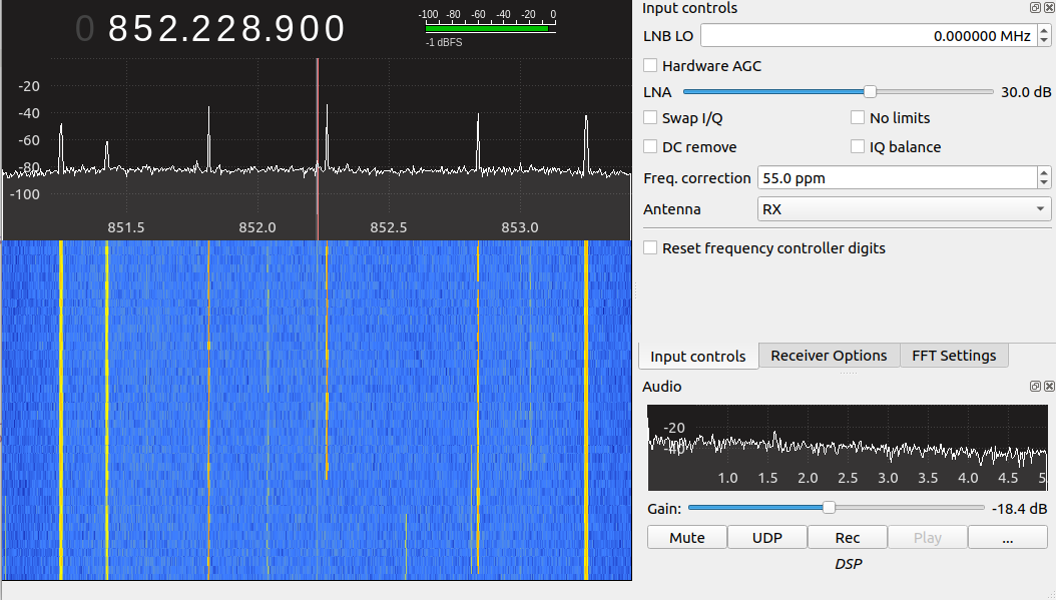

Traditional radio scanning is straightforward: select a frequency, wait for someone to talk, and listen. Trunked radio turns that comfortable little routine into a fast-moving shell game. A conversation may begin on one frequency, continue on another, and jump again seconds later. Try following it manually and you will spend more time turning knobs than hearing complete sentences.
Software-defined radio, commonly called SDR, changes the situation. Instead of relying entirely on specialized scanner hardware, an SDR receiver sends a slice of the radio spectrum to a computer. Software then identifies the control channel, interprets channel assignments, follows talkgroups, decodes supported digital audio, and organizes the resulting activity.
The result is not merely a cheaper scanner. It is a flexible radio-analysis platform capable of displaying system identifiers, logging radio activity, recording individual calls, applying talkgroup priorities, and revealing how a trunked network actually operates.
What Makes a Trunked Radio System Different?
A conventional radio system normally assigns a fixed frequency to a particular channel or user group. The fire department may use one frequency, a road crew another, and a utility company a third. Even when nobody is talking, those frequencies remain reserved.
A trunked radio system uses spectrum more efficiently. Multiple departments or organizations share a pool of frequencies. A central controller assigns an available voice channel whenever a user presses the push-to-talk button.
“`
The Control Channel Runs the Show
Most modern trunked systems continuously transmit data on a control channel. Subscriber radios monitor that channel and wait for instructions. When a user requests a call, the system sends a channel grant containing information such as the assigned traffic frequency and talkgroup identification number.
Every radio associated with that talkgroup automatically moves to the assigned frequency. When the call ends, those radios return to the control channel and wait for the next assignment.
To a listener using an ordinary receiver, the conversation appears to bounce unpredictably around the band. To trunk-tracking software, the movement is not random at all. The control channel is effectively narrating the entire process.
Talkgroups Replace Traditional Channels
A talkgroup is a logical communications channel rather than a permanently assigned radio frequency. A trunked system might have talkgroups for dispatch, maintenance, emergency management, transit operations, hospitals, public works, or event coordination. All of them can share the same physical frequency pool.
Software usually identifies talkgroups by numeric IDs. Users can assign readable aliases such as “County Fire Dispatch” or “Transit Operations,” transforming a screen full of mysterious numbers into something understandable.
How Software-Defined Radio Follows a Conversation
An SDR receiver converts radio signals into digital samples known as in-phase and quadrature, or I/Q, data. The computer processes those samples using software rather than depending on a large collection of fixed hardware circuits.
A typical trunked radio monitoring chain has several stages:
- The SDR captures a section of radio spectrum.
- The software locates and demodulates the control channel.
- A protocol decoder interprets control-channel messages.
- The program identifies active talkgroups and channel grants.
- A receiver or virtual tuner moves to the assigned traffic channel.
- Supported analog or unencrypted digital audio is decoded.
- The call is played, logged, recorded, streamed, or ignored according to user-defined rules.
This process happens rapidly enough that the listener usually hears a call as one continuous exchange. Behind the scenes, the software may have changed frequencies several times. It is doing the frantic knob-twisting so the human can sit back with a beverage and pretend radio is relaxing.
Popular Software for Trunked Radio Monitoring
No single program is ideal for every operating system, radio protocol, or project. Some applications emphasize an approachable graphical interface, while others are designed for Linux servers, automated recording, or detailed protocol research.
SDRTrunk
SDRTrunk is a cross-platform Java application built for monitoring, decoding, recording, and streaming trunked and related radio systems. It supports multiple SDR families, including common RTL2832-based receivers, Airspy devices, HackRF models, and several SDRplay receivers.
Its graphical interface can display active calls, talkgroups, radio identifiers, aliases, system events, and tuner activity. Playlist-based configurations allow users to define systems, sites, channels, aliases, priorities, recording preferences, and streaming rules.
SDRTrunk is particularly attractive to users who want an integrated application rather than a collection of separately connected programs. Depending on the platform and digital voice mode, an additional compatible audio library may be required for certain vocoders.
OP25
OP25 is a well-established open-source software suite focused heavily on Project 25 radio. It can follow P25 Phase 1 and Phase 2 systems, process trunking control information, apply talkgroup lists, assign priorities, and provide metadata for local playback or streaming.
It is commonly used on Linux computers and small single-board systems. OP25 offers considerable flexibility, but its configuration files and command-line workflow can feel intimidating at first. It rewards patient users who enjoy understanding exactly what each component is doing.
Unitrunker
Unitrunker is known for decoding and analyzing trunking control channels. It can track system activity, frequencies, sites, talkgroups, affiliations, and individual radio IDs on several trunking formats.
Historically, many setups paired one receiver dedicated to the control channel with another receiver assigned to voice traffic. Newer SDR configurations can be more flexible, but the basic concept remains useful: one virtual receiver watches the system controller while another follows calls.
Unitrunker is especially useful when the goal is to study how a system behaves rather than simply listen to audio.
Trunk Recorder
Trunk Recorder is designed to capture calls from trunked and conventional systems using one or more SDR receivers. It uses GNU Radio signal-processing components and technology derived from the OP25 ecosystem for much of its P25 handling.
Instead of behaving like a traditional live scanner, it can create separate audio files and metadata for individual calls. This makes it suitable for searchable archives, research projects, incident review systems, and community platforms such as OpenMHz, subject to applicable laws and responsible publishing practices.
Digital Speech Decoders
Programs in the Digital Speech Decoder family can process supported unencrypted digital voice formats. These tools may be combined with an SDR front end or used as part of a larger monitoring chain. Compatibility varies by release, protocol, operating system, and audio-routing method.
A digital decoder is not a magic encryption remover. Properly encrypted communications remain unintelligible without authorized keys, and responsible software normally identifies or skips those calls.
GNU Radio
GNU Radio is a free, open-source signal-processing toolkit rather than a ready-made police scanner application. It provides reusable blocks for filtering, demodulation, resampling, synchronization, decoding, and visualization.
Developers can assemble these blocks into flowgraphs using Python, C++, or GNU Radio Companion. The learning curve is steeper, but it offers the freedom to experiment with unusual signals, create custom decoders, analyze recorded I/Q data, or prototype an entirely new trunk-tracking workflow.
Choosing SDR Hardware
A basic RTL-SDR receiver is often sufficient for learning about trunked radio. These inexpensive USB devices can receive wide portions of the VHF and UHF spectrum, including many land mobile radio bands. They are not laboratory instruments, but they provide remarkable capability for their price.
Higher-performance receivers may offer greater instantaneous bandwidth, improved filtering, better dynamic range, more stable oscillators, or stronger resistance to nearby signals. Those advantages become important in dense urban radio environments.
One Receiver or Several?
A single SDR may follow a system when the control and traffic channels fit within its usable bandwidth. The software can create multiple virtual tuners inside that captured spectrum without physically retuning the receiver.
If the system frequencies are spread farther apart, the program may need to retune rapidly or use additional SDR devices. Automated recording systems also benefit from multiple receivers because several talkgroups may be active simultaneously.
Before buying a small USB army, inspect the system’s frequency range and compare it with the bandwidth supported by the intended hardware and software.
The Antenna Is Not an Optional Decoration
Users frequently blame the decoder when the real problem is a poor signal. A suitable antenna, low-loss feed line, sensible placement, and controlled gain can improve performance more than switching applications.
Maximum gain is not always best. Excessive gain can overload the receiver, raise the noise floor, and allow strong nearby transmitters to create unwanted mixing products. Adjust gain while watching the spectrum and decoder quality rather than automatically sliding every control to the right.
A Sensible Trunked Radio Software Workflow
1. Identify the Local System
Begin by determining the system type, site frequencies, control channels, and geographic coverage. Public frequency databases, FCC licensing information, and local radio-reference communities can provide useful starting data.
Do not assume that every listed control channel is active. Systems may rotate between primary and alternate channels or use different sites across a large region.
2. Confirm the Control Channel
Use a spectrum display or waterfall to locate a strong, continuously transmitting signal on one of the listed control frequencies. A valid decoder should begin displaying recognizable system information rather than producing an endless parade of errors.
3. Calibrate Frequency Accuracy
Low-cost receivers may tune slightly above or below the requested frequency. Frequency correction, often expressed in parts per million, helps center the signal. Some programs can estimate or automatically adjust this value.
Calibration errors are particularly troublesome with narrow digital signals. Being “almost on frequency” may be good enough for casual analog FM but terrible for reliable control-channel decoding.
4. Build Talkgroup and Alias Lists
Once the system is decoding, assign descriptive names to useful talkgroup IDs. Create categories for fire, transportation, utilities, public works, or other lawful monitoring interests. Unknown groups can be logged until their normal purpose becomes clear from repeated activity.
5. Set Priorities and Filters
A busy regional system may produce hundreds of calls. Listening to everything quickly becomes the radio equivalent of standing in a crowded cafeteria while everyone speaks at once.
Use priorities, allow lists, block lists, and temporary holds to focus on relevant talkgroups. Skip encrypted calls and routine groups that do not match the project’s purpose.
6. Add Recording Carefully
Call recording can be valuable for technical testing and authorized research. It can also create privacy, storage, and legal responsibilities. Establish retention limits, protect stored data, and avoid publishing sensitive communications merely because the software makes uploading easy.
Solving Common Reception Problems
Simulcast Distortion
Large public-safety networks may transmit the same signal from several towers at nearly the same time. A receiver located between those sites can receive overlapping copies with slightly different arrival times. This condition, commonly associated with simulcast systems, may cause broken audio or poor decoding even when the signal meter looks impressive.
Possible improvements include moving the antenna, reducing gain, using a directional antenna, trying a receiver with better I/Q performance, or selecting software with strong handling of the relevant modulation. Oddly enough, moving an indoor antenna a few feet can sometimes beat an afternoon of advanced configuration.
Weak or Unstable Control-Channel Decoding
Check frequency correction, antenna position, gain, USB noise, sample rate, and CPU load. A clean signal centered in the passband is more useful than an enormous but distorted signal.
Also verify that the selected protocol matches the system. A P25 decoder will not negotiate with an unrelated signal simply because you stare at it sternly.
Missed Calls
Calls may be missed when the SDR cannot cover both the control and traffic frequencies, when multiple conversations occur simultaneously, or when the computer cannot process samples quickly enough. Reducing the sample rate, closing unnecessary applications, or adding another receiver may help.
Choppy Digital Audio
Digital voice is less forgiving than analog audio. Below a certain signal-quality threshold, speech may suddenly become robotic or disappear. Improve the RF signal first. Audio settings cannot repair data that the receiver never decoded correctly.
Incorrect Talkgroup Labels
System administrators can reorganize talkgroups, and database information may become outdated. Treat labels as working descriptions rather than permanent truth. Compare repeated activity, system metadata, and reliable database updates before publishing an identification.
Understanding P25 Phase 1 and Phase 2
Project 25 is a family of standards intended to improve interoperability among public-safety land mobile radio systems. P25 defines messages, procedures, interfaces, and radio behaviors rather than requiring every manufacturer to build identical equipment.
P25 Phase 1 commonly uses one voice path per 12.5 kHz radio channel. P25 Phase 2 uses two-slot time-division multiple access on its traffic channels, allowing two voice paths to share the same 12.5 kHz allocation. Software must identify the correct mode and decode the applicable signaling and voice format.
A Phase 2 system may still use a Phase 1-style control channel, although system configurations can vary. This is one reason proper software support matters: simply tuning to a traffic frequency does not reveal the full structure of the network.
Legal and Ethical Boundaries
Receiving radio signals and transmitting on radio systems are entirely different activities. Unauthorized transmission, interference, impersonation, or access to protected systems can lead to serious penalties. An SDR receiver should remain a receiver unless the operator has the appropriate authorization, equipment, and license for a permitted transmitting activity.
Monitoring laws also vary by state, locality, situation, and intended use. Restrictions may apply to scanner use in vehicles, use during the commission of a crime, recording, commercial exploitation, or redistribution. Users should review current federal, state, and local requirements before building a permanent feed or archive.
Encryption deserves an especially clear boundary. Software can recognize that a transmission is encrypted, but it should not be treated as an invitation to defeat the protection. Skip the call and move on. There will always be another unencrypted maintenance crew discussing a stubborn gate.
Practical Experience: What a Realistic First Build Teaches
A typical first attempt at tackling trunked radio with software begins with optimism, one inexpensive SDR dongle, and the belief that the entire project will be operational before lunch. The spectrum display appears, signals dance across the waterfall, and confidence rises rapidly. Then the control-channel decoder reports errors, audio sounds like an irritated robot, and lunch becomes a distant memory.
The first useful lesson is that configuration is rarely the only problem. In one representative setup, the software had the correct system type and control-channel frequency, yet decoding remained unstable. The receiver’s frequency error was small enough that the signal looked centered to the eye but large enough to damage the digital data. Applying a modest frequency correction transformed scattered messages into a steady stream of site information, channel grants, and talkgroup activity.
The second lesson is that more gain is not automatically more radio. Increasing gain initially made the signal meter climb, which felt like progress. At the same time, the decoder’s error rate became worse because a strong nearby transmitter was overloading the front end. Reducing gain produced a visually smaller but cleaner signal. Digital decoding improved immediately.
Antenna placement created another surprise. An antenna near a window produced strong signals but severe simulcast problems. Moving it toward the center of the room weakened one tower more than another and improved the desired signal’s timing relationship. The control channel became more stable, and voice calls stopped breaking apart. Radio is occasionally the only hobby in which moving an antenna away from the window can count as an upgrade.
The next challenge was organization. Allowing every discovered talkgroup resulted in constant audio, much of it routine and unrelated to the original monitoring goal. Building alias groups and priority rules made the system far more usable. Important dispatch channels received high priority, technical talkgroups were retained for analysis, and encrypted or irrelevant traffic was skipped.
Recording also required discipline. Saving every call consumed storage quickly and created a large collection with little practical value. A better approach was to record selected talkgroups, use descriptive filenames and metadata, and delete files automatically after a defined retention period. The project became easier to manage and less likely to preserve sensitive material unnecessarily.
CPU performance mattered once multiple channels were active. The computer handled one control channel comfortably but began dropping samples when several virtual receivers, audio decoders, and recording tasks ran together. Lowering the sample rate to the amount actually required reduced processing load. Moving archival conversion to a separate process prevented it from competing with real-time decoding.
The most valuable experience was learning to troubleshoot one layer at a time. First confirm that the SDR works. Next verify the signal in a spectrum viewer. Then establish stable control-channel decoding. Only after that should talkgroup following, digital audio, recording, streaming, or elaborate dashboards enter the picture.
When everything is configured correctly, the final system feels almost effortless. The software quietly watches the control channel, selects calls according to priority, follows frequency assignments, attaches readable aliases, and stores useful metadata. Reaching that point requires patience, but the troubleshooting process teaches far more about digital radio than simply purchasing a preprogrammed scanner and pressing the scan button.
Conclusion
Tackling trunked radio with software turns a confusing collection of rapidly changing frequencies into an organized stream of talkgroups, system events, and individual calls. SDR technology makes the control channel visible, allowing a computer to follow channel assignments automatically rather than forcing a listener to chase them manually.
SDRTrunk provides an approachable integrated environment, OP25 offers powerful P25-focused tools, Unitrunker excels at control-channel analysis, Trunk Recorder supports automated call capture, and GNU Radio gives developers the building blocks for custom experiments.
The best results come from treating the project as both a radio problem and a software problem. Accurate tuning, sensible gain, a suitable antenna, sufficient processing capacity, correct protocol settings, and carefully organized talkgroups all matter. Add legal awareness and responsible data handling, and a modest SDR station can become a remarkably capable window into modern trunked communications.
“`
“`