
Calorie tracking has a reputation. For some people, it’s helpful and practical. For others, it’s a one-way ticket to
“Why am I negotiating with a tablespoon of peanut butter like it’s a hostage situation?”
Lifesum (available on iOS and Android) tries to soften that whole vibe. Instead of acting like a strict hall monitor
for your lunch, it leans into progress-over-perfection language, habit building, and a more “let’s learn from the
pattern” approach. The result: a food tracking app that can still do the numbers, but doesn’t have to feel like it’s
grading your personality.
Quick Snapshot: What Lifesum Is (and Isn’t)
- Best for: people who want calorie + macro tracking with a calmer, more holistic tone
- Also great for: hydration reminders, habit nudges, food quality insights, and meal planning (Premium)
- Not ideal for: anyone who finds tracking triggering, or who wants ultra-clinical micronutrient deep dives
- Big promise: multiple logging options (including AI-assisted) so tracking feels less like homework
Why Lifesum Feels “Less Stressy” Than Many Tracking Apps
The best tracking apps don’t just count things. They reduce friction. Lifesum does that in a few ways that matter
if you’ve ever rage-quit a food diary because it couldn’t recognize “homemade stir-fry-ish situation.”
1) It avoids the “good food / bad food” morality play
Lifesum is built around helping you balance meals rather than labeling foods as virtuous or “ruined your day.”
Its food and meal rating approach is meant to give contextthink “more fiber here,” “more protein there”instead of
turning nutrition into a courtroom drama.
2) Progress language beats perfection language
Lifesum’s messaging emphasizes small wins and manageable changes. That’s not just fluffy brandingtone impacts
whether people keep using a tool long enough to get value from it. If an app makes you feel judged, you’ll delete it.
If it makes you feel capable, you’ll open it tomorrow.
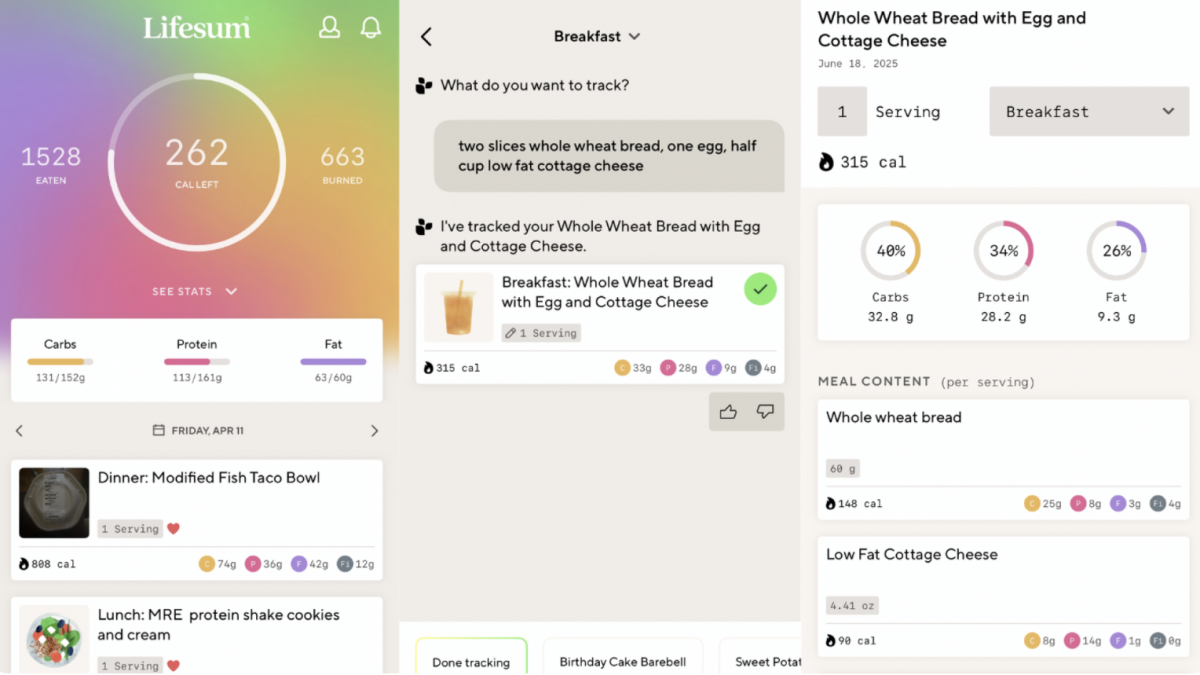
3) Logging is flexible (photo, voice, barcode, text)
Lifesum’s newer approach is “track your way.” That means you can log meals with a photo, voice, typing, or barcode
scanning. The best part is that you don’t have to use the same method every timequick options exist for busy days,
and more detailed entries are there when you want them.
Core Features: What You’ll Actually Use Day to Day
Food logging that doesn’t feel like a spreadsheet
At its simplest, Lifesum is a food diary with a calorie counter and macro tracking. You can search foods, scan
barcodes, and save favorites so you’re not re-entering “Greek yogurt” like it’s brand-new information every morning.
The interface is one of Lifesum’s biggest strengths. It’s designed to feel modern and visual, which matters more than
it sounds like it should. If an app looks and feels friendly, you’re more likely to use it consistentlyand consistency
is where tracking becomes useful rather than annoying.
Macro tracking + nutrient context
Lifesum doesn’t stop at calories. It also tracks macros (protein, carbs, fat) and offers nutritional breakdowns that
help you see patterns: for example, you might notice you’re regularly under-eating protein at breakfast, or not
getting much fiber across the day. That’s the kind of insight that can change habits without demanding perfection.
Food ratings, meal ratings, and “Life Score”
Lifesum’s signature features revolve around feedback loops. Food ratings provide a quick take on nutritional quality,
while the weekly Life Score looks at your habits more broadly. The goal is to connect the dots between what you do
most days and how you feelnot to punish you for a random cupcake on a Thursday.
Practical example: if you log meals for a week, Lifesum can show whether you’re consistently low on vegetables or
omega-3-rich foods, or whether hydration drops off on busy days. This is where Lifesum steps into “coach” territory
rather than “calculator” territory.
Hydration, habit nudges, and simple trackers
Lifesum includes tracking for water and other habit-style goals. These may feel small, but they’re often the easiest
wins. If calorie tracking is the advanced class, hydration reminders are the friendly tutor that helps you pass without
crying in the hallway.
Intermittent fasting tools
Lifesum supports fasting intervals and related plans. Whether fasting is right for you depends on your health history
and preferences, but as an app feature, it’s convenient: you can set an eating window and track consistency over time.
If fasting is not your thing, you can ignore this entirely and still use Lifesum normally.
Integrations with other health apps and devices
Lifesum integrates with major platforms and wearables so your activity and health data can live in one place. If you
already use Apple Health, Google Fit, Fitbit, or a smartwatch, integrations can make your dashboard feel more complete
and reduce double entry.
Free vs Premium: What’s Locked, What’s Worth It
Lifesum is free to download, and you can do meaningful tracking without paying. That said, the paid version is where
Lifesum gets more “guided,” especially with meal plans and programs.
What you can usually do for free
- Log foods and meals
- Track calories and get basic macro visibility
- Use barcode scanning (one of Lifesum’s standout free features)
- Track water and basic health habits
What Premium generally unlocks
- Meal plans and structured programs
- More advanced insights and deeper nutrient breakdowns
- Expanded recipe features and planning tools
- More tailored guidance based on your goals and preferences
How much does Lifesum cost?
Pricing can vary based on platform, region, and promotions. In the U.S. iOS App Store, Lifesum shows subscription
options (including monthly, quarterly, and annual) and may present free trials before billing begins. Some listings
also show multiple in-app purchase price points (often reflecting different plans or promotional packages).
Translation: you may see “per month” pricing in one place and “annual plan” pricing somewhere else. Before subscribing,
check the billing screen carefully so you know whether it’s monthly, quarterly, or annual.
Accuracy: The Good, the “Depends,” and the Blue Badge Problem
No calorie tracker is perfectly accurate. Restaurant meals vary. Homemade portions are guesses unless you’re weighing
ingredients. And food databasesespecially those with user-submitted entriescan include mistakes.
Verified vs user-created foods
One smart tip: when searching foods in Lifesum, look for verified items (often marked with a badge) rather than
relying on random user entries. Verified entries are more likely to match nutrition labels and reduce the “why does
this apple have 600 calories?” problem.
Photo and text logging: convenient, not magical
AI-assisted logging (photo, voice, text) can speed up tracking, but it’s best treated as a shortcut, not a lab-grade
measurement. A photo might get you close, but if you need precisionfor medical reasons or specific trainingmanual
edits and verified entries still matter.
What Real Users Tend to Love (and What Bugs Them)
Lifesum gets consistent praise for its design and “I’ll actually use this” interface. Many people like the way it
encourages balanced choices and habit consistency rather than daily perfection.
On the flip side, some users report friction around newer AI-focused updatesthings like features feeling less
streamlined than before, occasional glitches, or changes to how meals are organized. That doesn’t mean the app is
broken for everyone, but it’s a reminder to use the free version first and make sure the flow works for you before
committing to a longer paid plan.
Privacy: What to Know Before You Log Your Lunch
A nutrition app can hold sensitive information: eating habits, weight, health goals, and activity patterns. So it’s
worth reading the privacy labels and permissions screens like you’re checking a suspiciously enthusiastic terms-of-service
popup (because you are).
App Store privacy labels and tracking
On iOS, the App Store privacy section indicates categories of data that may be used to track you across apps and
websites owned by other companies, as well as data that may be linked to you (such as contact info and identifiers).
The exact data can vary by the features you use.
Data sharing with connected apps
If you connect Lifesum to a third-party health platform, the app may read activity, nutrition, steps, or sleep data
to populate your diary and calculate summaries. It may also write nutrition and hydration data back to connected apps,
depending on permissions you grant.
Retention and age considerations
Lifesum’s policies describe retaining data as needed for service purposes, and note that inactive accounts may have
data deleted or anonymized after a period of inactivity. They also state that children under 13 (or the local age of
digital consent, whichever is higher) aren’t allowed to submit personal data through the service.
Practical privacy tip: after setup, review your permissions (Health data access, tracking permissions,
notifications) and keep only what you actually want. A calmer experience often starts with fewer pop-ups.
Lifesum vs Other Popular Tracking Apps
The “best” nutrition tracker depends on what you want it to feel like.
-
If you want a calmer, habit-oriented feel: Lifesum is strong here, especially with its Life Score
and balanced-meal emphasis. -
If you want deep micronutrient science: some apps focus more heavily on detailed nutrient breakdowns
and data accuracy above all. -
If you want a huge social ecosystem: some trackers have bigger communities and more public challenges.
Lifesum is more “quiet coach” than “social feed.” -
If you want pure simplicity: the easiest app is the one you’ll keep. Lifesum’s design helps it compete
in that category.
Pros and Cons
Pros
- Friendly, modern interface that makes tracking feel less like punishment
- Multiple logging methods (photo, voice, typing, barcode) to reduce friction
- Holistic features: hydration, habits, weekly Life Score, and meal ratings
- Barcode scanning available without paying (a big deal compared to some competitors)
- Strong integrations with major health platforms and devices
Cons
- Meal plans and many guided programs are Premium-only
- User-submitted food entries can be inaccurate if you don’t choose verified items
- AI-focused updates may feel clunky to some users depending on device and preference
- Not the most “clinical” option if you want maximum micronutrient detail
Who Should Try Lifesum (and Who Should Skip It)
Try it if you want:
- A calorie and macro tracker that doesn’t feel like it’s yelling at you
- Nutrition tracking plus habit support (water, weekly check-ins, gentle nudges)
- Meal planning tools (especially if you like structure without extreme rules)
- A visually clean app that makes logging faster and less annoying
Skip it (or use cautiously) if:
-
Tracking makes you anxious, obsessive, or ashamed. In that case, a mindful eating app or professional support may
be a better fit than calorie counting. -
You’re a teen and feel pressure to restrict food or chase numbers. Growing bodies need consistent nourishment, and
apps can sometimes make normal eating feel like a performance review. If you’re unsure, talk to a parent/guardian
or a qualified clinician. - You want a massive in-app community and social challenges as the main motivator
Final Verdict
Lifesum is a polished, modern nutrition tracker that aims to make logging feel supportive instead of shame-y. Its
standout strengths are flexibility (log in different ways), a “whole picture” approach (not just calories), and an
interface that encourages consistency without acting like food is a moral test.
The trade-off is familiar: the free version is useful, but Premium is where meal plans and deeper guidance live. And,
as with any app that evolves, some users may love the newer AI features while others prefer the old-school simplicity.
If you want a tracker that can do the math and keep its emotional tone chill, Lifesum is one of the better
options in the category.
Experience Section: A Realistic “Low-Stress” Way to Use Lifesum (About )
I can’t personally use apps, but I can walk you through what a realistic first couple of weeks with Lifesum often
looks likebased on the app’s features, how it’s designed to be used, and the kinds of patterns people commonly
describe in reviews.
Days 1–3: The “Please Don’t Make Me Weigh My Blueberries” phase
Most people start with the simplest possible version of tracking: logging what they already eat without trying to
“optimize” anything. This matters because the fastest way to make tracking stressful is to treat Day 1 like you’re
auditioning for a nutrition documentary.
Lifesum’s flexible logging helps here. If you’re in a hurry, you might use barcode scanning for packaged foods and
quick search for basics. If you’re eating something homemade or restaurant-ish, a photo or quick-entry style log can
help you capture the meal without turning dinner into a data-entry job.
Days 4–7: Patterns show up (and that’s the point)
By the end of the first week, the app starts doing what it’s really meant to do: showing patterns. Not “you failed,”
not “you succeeded,” but simple trends. For example:
- You might notice breakfast is consistently low in protein.
- Water tracking looks great on weekdays and disappears on weekends (mysterious!).
- Your meals are balanced… until mid-afternoon when snacks appear like surprise guests.
This is where features like food ratings and Life Score-style weekly feedback can feel helpfulbecause they’re built
to summarize habits rather than obsess over individual meals.
Week 2: Small tweaks, not big overhauls
The “no stress” version of Lifesum is about tiny experiments. Instead of changing everything, you try one small move:
add a fruit or vegetable once a day, drink one extra glass of water, or plan one easy lunch so you’re not forced into
a last-minute snack scavenger hunt.
If you choose Premium, week two is often when meal plans become usefulespecially if decision fatigue is your biggest
barrier. Having a plan (and a grocery list) can make “healthy eating” feel less like a daily negotiation with your
brain. If you don’t go Premium, you can still use favorites and saved meals to reduce friction.
What keeps it shame-free
The key mindset shift is treating Lifesum like a dashboard, not a judge. A dashboard doesn’t scold you for running
low on gas. It just tells you what’s happening so you can decide what to do next. When people enjoy Lifesum, it’s
usually because they use it to learn patterns, not to chase perfect numbers.
And if a feature starts feeling stressful (like watching every macro bar turn colors), the healthiest “power move” is
to zoom out, simplify logging, and focus on the habits that actually make you feel better in real life.