
Getting paid should feel like getting paidnot like solving a mystery novel where the villain is “Pending.”
If you’re new to PayPal (or you’ve used it forever but still panic when you see a hold), this guide walks you through
every practical way to accept and receive money on PayPal in the U.S., plus the fees, common hiccups, and the
scam-proof habits that keep your balance from turning into a soap opera.
Whether you’re collecting rent from roommates, invoicing clients, selling online, or getting reimbursed for that group dinner
where you “accidentally” ordered dessert, PayPal can be fast and convenientif you set it up the right way.
1) Set Up PayPal to Receive Money (Without Future Regret)
PayPal is happiest when your account is complete and verified. The goal is simple:
make it easy for people to pay you, and make it easy for PayPal to trust you.
Create your account and confirm the basics
- Sign up with an email you actually use.
- Confirm your email (this is not optional if you want fewer “unclaimed” surprises).
- Add a phone number for account security and smoother payments.
- Link a bank account and/or debit card so you can withdraw funds easily.
In many cases, you receive money when someone sends a payment to the email address or phone number on your PayPal account.
You’ll typically see it on your account home screen once it arrives, and you can keep it in your PayPal balance or move it to your bank.
Personal vs Business account: which one do you need?
- Personal account: great for friends/family transfers, casual selling, and everyday payments.
- Business account: better for invoicing, selling as a business name, offering checkout options, and keeping finances tidy.
You can start with personal and upgrade later, but if you’re getting paid like a pro (clients, customers, side hustle),
a business setup often makes your life easierespecially for invoices and payment tools.
2) Ways to Accept & Receive Money on PayPal
PayPal gives you multiple “doors” people can use to pay you. The best door depends on whether you’re getting paid by
someone you trust, a client, or a customer buying something.
A) Get paid via your email or mobile number
The simplest method: you give someone the email/phone on your PayPal account, and they send money to it.
This is common for reimbursements, rent splits, or “I owe you for tacos” moments.
Tip: Use a dedicated “payments” email for business activity so your personal inbox stays… somewhat peaceful.
B) Request money (inside PayPal)
If you want to look organized (and you do), use PayPal’s Request feature. You enter the person’s email/phone,
the amount, and a note. PayPal notifies them, and you get notified when it’s paid.
Best for: roommates, clients who “forgot,” group trips, and anyone who needs a gentle digital nudge.
C) Share a PayPal.Me link (the “easy button”)
PayPal.Me lets you create a personalized link that you can share anywheretext, email, social, your website, even in your bio.
People click, enter an amount, and pay you. It’s basically “send money here” without the awkwardness of repeating your email address
like you’re spelling your name to customer support.
Best for: freelancers, creators, consultants, and anyone who wants a clean “pay me” link.
D) Send invoices (for clients and customers)
Invoices are where PayPal starts looking like a serious business tool. You can list items/services, include tax or shipping,
attach notes, and send a professional bill. The payer can often pay by PayPal, card, and sometimes other options depending on your setup.
Best for: services (design, marketing, coaching), contractors, and small businesses that want documentation.
E) Accept payments in-person (QR codes and more)
If you sell in person (pop-up, farmers market, local service), PayPal supports QR-based payments and other merchant options.
This can be a lightweight alternative to traditional card terminalsthough you’ll want to understand the fees and what counts as a commercial transaction.
F) Website checkout (PayPal Checkout / cards)
For e-commerce or online booking, PayPal offers checkout solutions that can accept PayPal and cards. This is the “real store” route:
smoother customer experience, receipts, clearer transaction classification, and better integration with your sales workflow.
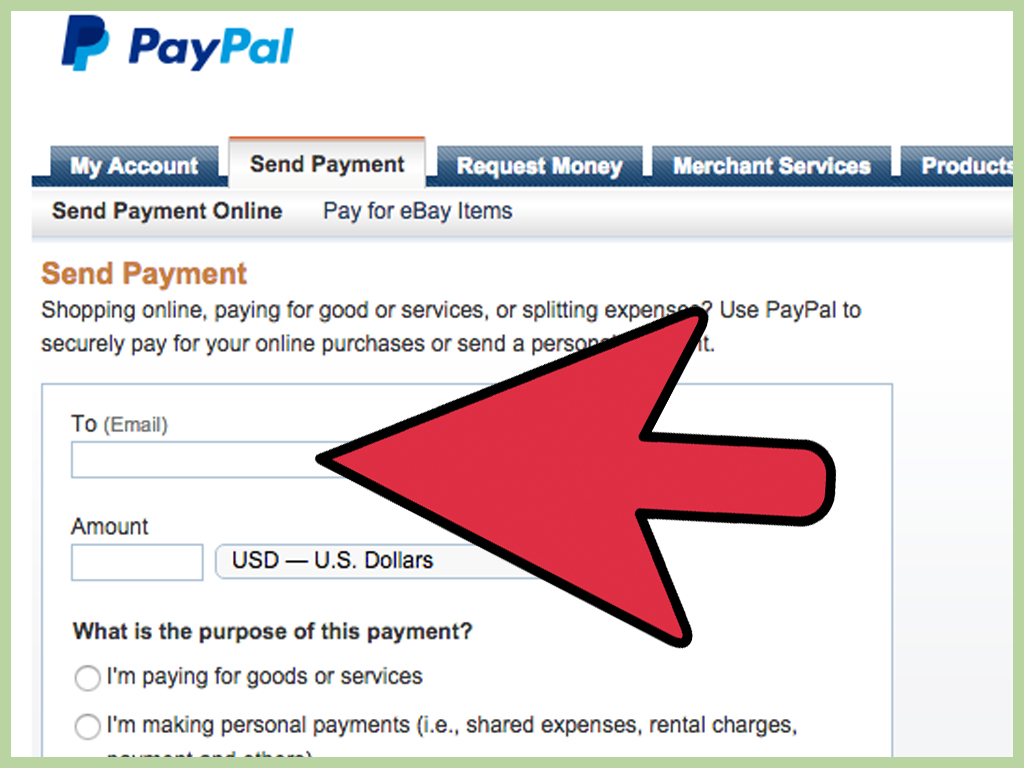
3) Friends & Family vs. Goods & Services: The Most Important Click You’ll Make
PayPal commonly asks the sender to pick a payment type. This choice affects fees and protections.
In other words: it can affect whether you get paid smoothlyor end up starring in a dispute.
Friends & Family (Personal payments)
- Use for: people you trust (family, friends, roommates), gifts, shared expenses.
- Protection: generally not covered by Purchase Protection for the sender.
- Fees: can be free in the U.S. when funded by bank account or PayPal balance; card-funded personal payments may have a fee for the sender.
The big warning: don’t use Friends & Family to buy from strangers. If something goes wrong,
the buyer may have fewer protectionsand you may have a harder time resolving disputes cleanly.
Goods & Services (Commercial payments)
- Use for: selling items, services, digital products, invoices, anything “business-y.”
- Protection: eligible purchases may be covered by PayPal Purchase Protection; sellers may qualify for Seller Protection if requirements are met.
- Fees: typically includes a seller fee (processing fee) deducted from what you receive.
Think of it this way: Friends & Family is for “here’s money because we like each other.”
Goods & Services is for “here’s money because you sold me something, and we want receipts and rules.”
4) PayPal Fees, Decoded (Without the Headache)
PayPal fees vary based on how you get paid (invoice vs checkout vs QR),
what the payment is classified as (commercial vs personal),
and sometimes whether the payment is domestic or international.
Common fee categories you’ll run into
- Goods & Services (“Send/Receive Money for Goods and Services”): a percentage fee deducted from the seller/receiver.
- Checkout / Guest Checkout: often a percentage + a fixed fee (based on currency).
- Invoicing transactions: fee depends on the payment method used to pay the invoice (PayPal/Venmo vs card/Apple Pay vs Pay Later).
- Instant transfer withdrawals: a percentage fee if you move money to your bank/debit card instantly.
Example 1: Getting paid $100 for a service (Goods & Services)
If a client sends $100 as a Goods & Services payment and your fee is 2.99%,
the fee is $2.99 and you receive $97.01.
Example 2: Sending a $500 invoice paid through PayPal Checkout
If the invoice is paid using a method that charges 3.49% + $0.49 (USD fixed fee),
the fee is: $500 × 0.0349 = $17.45, plus $0.49 = $17.94.
You receive $482.06.
Example 3: Instant transfer fee vs standard transfer fee
With an instant transfer fee of 1.75%, moving $100 instantly costs $1.75 (so $98.25 lands).
But a standard transfer (1–3 business days) may be freeso if you can wait, you keep more of your money.
Quick fee-saving habits
- Use the right payment type. Don’t “Friends & Family” a customer payment just to dodge feesthis can backfire.
- Build fees into pricing. If you sell a service, your price should reflect processing costs.
- Choose standard transfer when you can. Instant transfers are convenient, but convenience usually has a receipt.
- Watch for international + currency conversion. Cross-border payments can add extra percentage fees and conversion spreads.
5) Payment Holds: Why PayPal Sometimes Says “Not Yet”
A payment hold is PayPal’s way of saying, “We believe you… but we’d like to believe you with documentation.”
Holds can happen, especially with newer sellers or accounts that suddenly increase volume.
Common reasons for holds
- New seller / limited history: some accounts may have initial payments held for up to 21 days.
- Higher-risk transactions: unusual amounts, unusual patterns, or higher dispute risk categories.
- Account verification needed: identity confirmation or missing account details.
How to get funds released faster
- Add tracking for shipped items. If you’re selling physical products, upload shipment details promptly.
- Update order status for services or virtual products (mark as completed when appropriate).
- Confirm your identity and keep your account info current (bank/card, phone, email).
- Deliver consistently and reduce disputes: clear descriptions, responsive communication, realistic timelines.
Translation: PayPal wants proof you delivered what you promised. The faster you provide that proof,
the faster PayPal tends to relax.
6) How to Withdraw (Receive) Your PayPal Money Into Your Bank Account
Receiving money in PayPal is only half the story. The next question is: “How do I get it into my actual bank account
where my bills live?” Here are the most common options.
Standard transfer (usually free, takes 1–3 business days)
Standard transfers typically take a couple business days. Weekends and holidays can slow things down
because banks enjoy naps.
Instant transfer (fast, fee applies)
Instant transfers can complete within minutes (timing varies by bank). The tradeoff is a feecommonly a percentage of the amount transferred.
Other ways to access funds
- PayPal Debit Card (if you have it): spend or withdraw from your PayPal balance.
- Check by mail: available in some cases, but slower and may have a fee.
- Direct deposit into PayPal balance: for eligible PayPal Balance accounts, you may be able to receive paycheck or government payments.
A practical “don’t leave it all in PayPal” note
Payment apps are incredibly convenient, but they aren’t always the best place to store large balances long-term.
Consumer regulators have warned that funds stored in payment apps may not always have the same protections
you’d get in a federally insured bank or credit union account. A simple habit: transfer your money out regularly.
7) Safety Checklist: How to Avoid PayPal Scams (and “Accidental” Chargebacks)
PayPal is popularso scammers are, too. The goal is not paranoia; it’s a repeatable process that keeps you safe
even when you’re tired, busy, and someone is typing in ALL CAPS about how urgently they need your item.
Red flags to treat like a smoke alarm
- Overpayment + refund request: “I sent too much, can you refund the difference?” Classic scam pattern.
- Fake confirmation emails: anything pushing you to ship before you see the money inside your PayPal account.
- Pressure to use Friends & Family: especially from strangers buying something.
- Off-platform communication traps: pushing you away from PayPal records (“Let’s do it by text only”).
Safe receiving habits that actually work
- Only trust what you see inside your PayPal account (not a screenshot, not an email “receipt”).
- Use Goods & Services for sales so the transaction matches the real-world scenario.
- Ship to the address shown in the transaction details and keep tracking documentation.
- For services/digital delivery: keep clear records of what you delivered and when.
- Report fraud quickly and follow official consumer guidance if you’ve been scammed.
The Federal Trade Commission has long warned that payment apps are commonly used in scams, and recommends reporting fraud
and taking steps to avoid sending money to people you don’t know. As a receiver, your best defense is documentation and
using the correct payment type.
8) Business Tips: Get Paid Faster and Look More Professional
If you’re receiving PayPal payments for business, you want three things:
clarity, trust, and less friction.
Use invoices for anything that resembles “work”
Invoices reduce confusion by showing line items, due dates, and what the customer is paying for.
They also help you track income, which is handy at tax time (and during those “wait, did they pay?” moments).
Use a PayPal.Me or payment link for speed
For repeat clients, a payment link can be faster than creating a fresh invoice every timeespecially for simple, fixed-price services.
Just make sure the payment type aligns with the transaction (commercial for commercial).
Reduce disputes with “boring” clarity
- Put deliverables and timelines in writing (even a simple email summary helps).
- Use clear descriptions on invoices (“Website audit – January 2026”).
- Confirm the client’s email and billing info before sending the invoice.
Know the basics of Seller Protection
Seller Protection can help in certain disputes (like unauthorized transaction claims) if you meet requirements
including providing acceptable proof of shipment or delivery within required time windows. If you sell physical items,
tracking and shipping to the address shown in transaction details isn’t “nice to have,” it’s the game.
Tax paperwork: keep it simple and keep records
If you receive payments for goods and services through payment platforms, you may encounter Form 1099-K reporting.
Threshold rules have been in flux in recent years, so the safest approach is:
keep clean records of business income and expenses, and check current IRS guidance for the tax year you’re filing.
Remember: getting a 1099-K doesn’t automatically mean all of it is taxableexpenses and refunds matter.
Wrap-Up: Your PayPal Receiving Strategy (In One Minute)
- For friends/family: use Friends & Family when appropriate; avoid it for purchases.
- For clients/customers: use invoices, checkout, or Goods & Services so protections and records match reality.
- Expect fees on commercial payments; price accordingly.
- Avoid holds by verifying your account, delivering fast, and documenting shipping/delivery.
- Withdraw smart: standard transfer when you can, instant transfer when you must.
- Stay scam-resistant: trust your PayPal dashboard, not emails and screenshots.
Once you’ve got the setup and habits in place, PayPal becomes what it’s supposed to be:
a simple, flexible way to get paidwithout the “why is my money practicing yoga in Pending?” anxiety.
Real-World Experiences: What People Usually Run Into (and How They Fix It)
This section is based on common, real-life patterns people report when using PayPalnot a fairy tale version where every payment arrives instantly
and nobody ever types “Hello???” in the chat. If you’ve used PayPal for more than a week, at least one of these will feel familiar.
Experience #1: “My client paid… but it says Pending.”
This is one of the most common “first-time invoice” panic moments. The client insists they paid. You refresh your screen like it’s a video game.
The fix is usually less dramatic than it feels: confirm whether the payment is actually pending (processing) or on hold (risk review).
For many users, the best move is to check the transaction details inside PayPal (not email), and see whether PayPal is asking for an action.
If it’s a service or digital delivery, updating the order status can help. If it’s a shipped item, adding tracking often helps.
The lesson: “Pending” isn’t always a problemit’s often just PayPal’s way of saying, “We’re doing our homework.”
Experience #2: “Someone wants to pay with Friends & Family so I ‘get more money.’”
This comes up constantly in marketplaces and informal selling. The buyer says they’ll use Friends & Family “to help you avoid fees,”
or they claim it’s the only method that works. In many cases, it’s either a misunderstanding or a manipulation tactic.
If you’re selling something (even a small item), you generally want the payment type to reflect a purchase. Why?
Because if anything goes wrongwrong address, delivery dispute, unauthorized transactionyou want the proper records and protections in place.
People who sell regularly learn a simple rule: if it’s a sale, it’s Goods & Services. The short-term fee savings aren’t worth the long-term risk.
Experience #3: “I got a ‘payment confirmation email’ but the money isn’t in my account.”
This is where scam prevention becomes practical. Fake PayPal emails can look convincing, especially when you’re busy and excited to make a sale.
The safest habit is also the simplest: if the money is real, it will appear in your PayPal account activity and balance.
If it’s not there, don’t ship, don’t deliver, don’t “upgrade your account,” and don’t click mysterious links.
Many sellers adopt a “dashboard-only” rule: they only act based on what they see after logging into PayPal directly (app or website).
It feels cautious the first time; it feels brilliant the second time it saves you from losing money.
Experience #4: “My payments are on hold for up to 21 daysam I in trouble?”
Payment holds can feel personal. They are not (usually) personal. They’re often a risk-control step, especially for new sellers or accounts
that suddenly start receiving bigger payments. People often resolve this faster by doing “boring” account hygiene:
confirming identity, linking a bank and phone number, keeping shipping and delivery records, and maintaining low dispute rates.
The key mindset shift: instead of arguing with the hold, treat it like a checklist. What proof does PayPal want? Provide it quickly.
Over time, sellers with consistent delivery history often see fewer holds and faster access to funds.
Experience #5: “Instant transfer is addicting… and then I noticed the fees.”
Instant transfer is the financial equivalent of food delivery: extremely convenient, occasionally expensive, and easy to overuse.
Many people start out using instant transfer for everything, then realize they’re paying a percentage fee repeatedly.
The “grown-up” workflow usually becomes:
standard transfer for routine payouts (weekly or twice a week), and instant transfer only for emergencies
(rent due today, inventory purchase, unexpected expense). This small change can save meaningful money over time, especially for freelancers
and small sellers who receive many payments per month.
Experience #6: “Tax season showed up, and now I wish I used invoices.”
Anyone who has ever tried to reconstruct a year of income from vague transaction notes knows the pain.
People often discover that invoices (or at least consistent notes and categories) are a lifesaver: you can see what was sold,
when it was sold, and to whom. And if you ever receive a 1099-K, you’ll want records that help you separate taxable business income
from reimbursements, refunds, and personal transfers. The smartest users don’t wait for tax season to start organizingthey build a habit:
invoices for business, clean notes for payments, and a monthly export or bookkeeping update.
Bottom line: the “best” PayPal experience isn’t luckit’s structure. Pick the right payment type, document delivery, withdraw on a schedule,
and trust your dashboard over messages. Do that, and PayPal stops being stressful and starts being what it should be: a tool that helps you get paid.