
We have all done it: typed a Twitter DM a little too fast, hit send with the confidence of a movie hero, and then instantly realized the message had the energy of a wet sock. Maybe it went to the wrong person. Maybe it sounded too intense. Maybe autocorrect decided to freestyle. Whatever the reason, the panic question is always the same: Can you unsend a DM on Twitter?
Here is the honest answer: not really, at least not in the magical “erase it from both sides like it never happened” way most people hope for. On Twitter, now called X, you can delete your direct messages and even remove entire conversations from your inbox. But that does not necessarily mean the other person loses access to them too. In other words, the delete button is useful, but it is not a time machine.
This guide breaks down exactly how Twitter DMs work, what happens when you delete a message, how to remove single DMs or full conversations, and what to do if you care about privacy and want fewer digital jump scares in your inbox. We will keep it practical, clear, and only mildly dramatic.
The Short Answer: Can You Unsend a DM on Twitter?
No, you cannot truly unsend a Twitter DM in the way people mean on apps like Instagram or some modern chat tools. Deleting a direct message on Twitter usually removes it from your account view. It does not guarantee the recipient will lose the message from their side.
That distinction matters. A lot. If you send a message and then delete it, the other person may still be able to read it in the conversation. They may also have already seen it through a push notification, email alert, or lock-screen preview before you got your “oops” finger warmed up.
So if you came here looking for a clean, instant “unsend Twitter DM” feature, the answer is disappointing but simple: Twitter DM deletion is mostly a personal cleanup tool, not a universal recall button.
What Happens When You Delete a Twitter DM?
Deleting a single message
When you delete an individual Twitter DM, you are mainly removing it from your own account. Think of it like cleaning your side of a shared table. Your napkin is gone, but the other person still has their plate, their drink, and your awkward comment floating in memory.
This is why so many users get confused. The interface makes deletion feel powerful, but the result is often much more limited. If your goal is inbox organization, great. If your goal is erasing evidence of a typo-filled midnight confession, less great.
Deleting an entire conversation
You can also delete a full DM thread from your inbox. That is useful when your messages page looks like a garage drawer full of old receipts, spam, abandoned group chats, and one suspicious “hey” from 2019.
But deleting a whole conversation still does not mean the other person loses the thread. In most cases, it simply disappears from your inbox. On their end, it can still remain visible.
What about encrypted messages?
X has introduced newer messaging and encrypted chat features over time, which makes the situation sound more futuristic than it feels. Even there, deleting a message or conversation generally helps remove it from your device view, but the recipient may still be able to see it. Translation: encryption may improve privacy in transit, but it does not automatically give you a perfect “take it back” wand.
How to Delete Your DMs on Twitter
If your goal is to tidy up your account, reduce clutter, or remove something from your visible conversation history, here is how to do it.
How to delete a single Twitter DM on mobile
- Open the X app and go to Messages.
- Tap the conversation that contains the DM you want to remove.
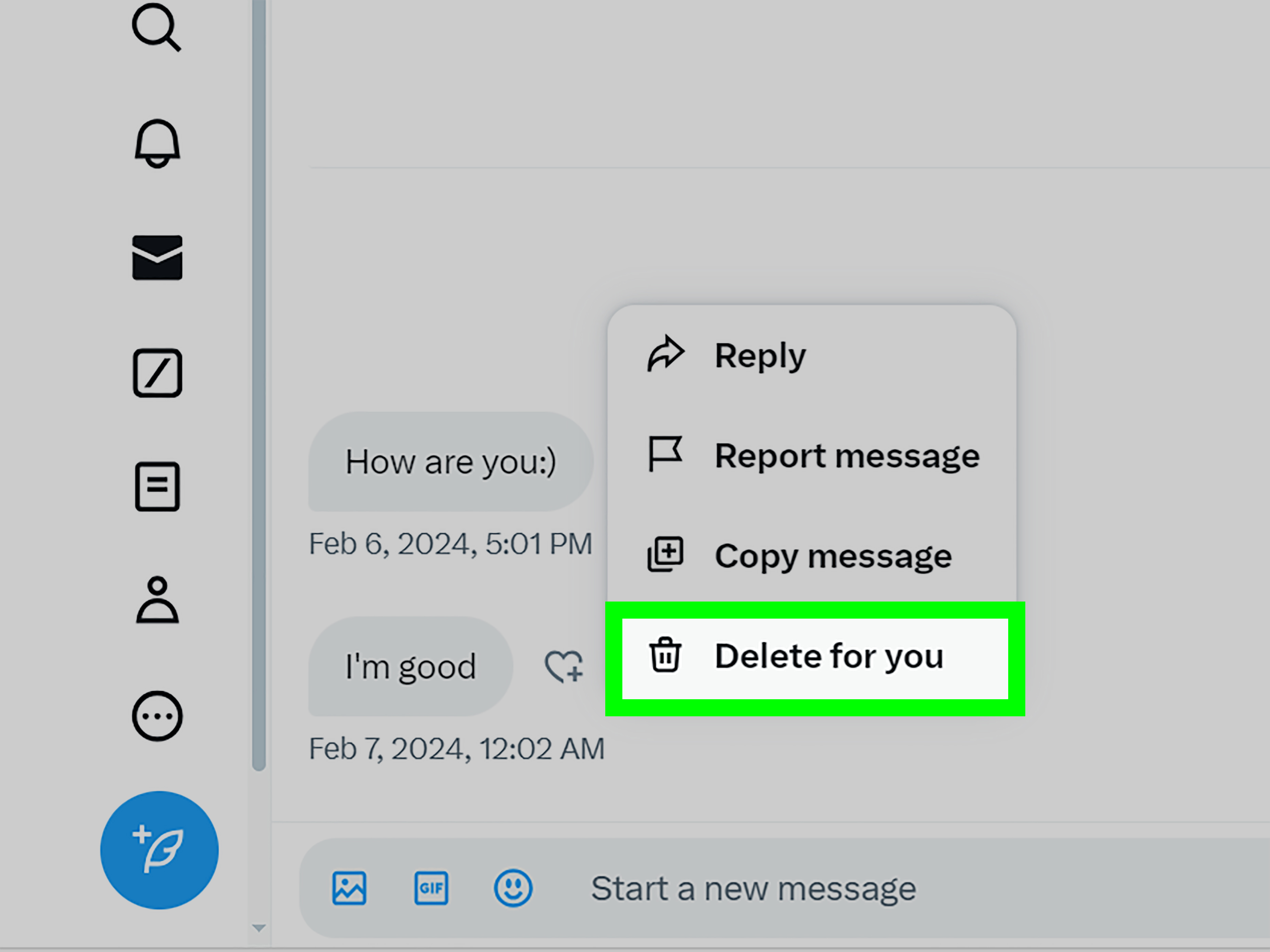
- Press and hold the specific message.
- Select Delete message.
- Confirm if prompted.
That removes the message from your account view. It is quick, easy, and emotionally similar to sweeping crumbs off a counter after the cake already fell.
How to delete a single Twitter DM on desktop
- Log in to X on the web.
- Open Messages.
- Select the conversation.
- Hover over the message you sent.
- Choose the delete option shown in the interface.
- Confirm the action.
Depending on the current web layout, the exact icon may vary. Older guides often show a trash can. Newer versions may tuck the option into a hover menu. Same mission, different outfit.
How to delete an entire DM conversation
To remove the whole thread from your inbox:
- Go to Messages.
- Find the conversation you want to remove.
- On mobile, swipe left on the conversation or tap and hold it, depending on your device.
- On desktop, open the conversation info area or use the available menu.
- Select Delete conversation.
- Confirm.
This is the best option when you want a cleaner inbox without deleting messages one by one. It is less “surgical precision” and more “I am done with this whole chapter.”
Will the Other Person Still See the DM?
Usually, yes. That is the key point most users need to understand before they start frantically tapping delete.
Deleting a Twitter DM does not reliably remove it from the recipient’s inbox. If the person already opened the conversation, they may still have the message. If they have notifications enabled, they may have seen part or all of it in a preview. If they took a screenshot, well, welcome to the oldest rule of the internet: once something is seen, it may be functionally immortal.
So if your question is, “Can I delete a Twitter message before they see it?” the safest answer is: maybe, but you should never count on it. Speed helps only sometimes. Certainty does not live here.
Can You Delete Twitter Messages From Both Sides?
Not as a standard native feature for regular Twitter DMs. That is what separates X from some other messaging platforms that offer true message recall.
Many users search for phrases like delete Twitter messages from both sides, unsend X DM, or remove DMs for everyone. The problem is that the platform’s deletion tools are mostly designed for your side of the conversation. They help you manage your inbox, not rewrite shared history.
This does not mean the feature could never evolve. Social platforms change. Menus move. Product teams get ambitious. But if you are using Twitter today and hoping for guaranteed two-sided deletion of a regular DM, you should assume the answer is no.
What If You Really Want the Message Gone?
Now we get to the part nobody loves, because it involves realism.
1. Ask the other person to delete it
If the message matters and the recipient is reasonable, the simplest option is also the least glamorous: ask them politely to remove it. Yes, this feels awkward. Yes, it may still be your best shot.
A calm note like, “Hey, I sent that by mistake. Could you delete it?” works better than a three-paragraph panic monologue with seventeen apologies and a bonus emoji you did not mean to use.
2. Delete it from your side anyway
Even if deletion is not universal, it still helps keep your own inbox cleaner. That matters more than people think, especially if you share devices, scroll old threads often, or simply do not want to reread your own regrettable prose.
3. Tighten your DM settings
If your bigger issue is spam, random message requests, or conversations you never wanted in the first place, change your direct message settings. Limiting who can message you can dramatically reduce clutter and future cleanup missions.
In settings, you can restrict message requests and make it harder for strangers to land in your inbox. This is less exciting than “unsend,” but much better for your peace of mind.
4. Block, DM block, or report problem accounts
If the conversation is abusive, creepy, or spammy, deletion alone is not the real solution. Use the platform’s tools to block the account, block messages from that user, or report the interaction. Inbox cleanup is not the same thing as safety management.
5. Understand the account deletion option
Some people wonder whether deactivating or deleting their account will wipe their DMs. The answer is more complicated than most expect. During the deactivation period, your DMs are not deleted right away. After the deactivation period ends and the account is fully deleted, sent direct messages are also deleted. That is a much bigger step than deleting a single message, so it should not be treated like a casual cleanup trick.
Common Mistakes People Make With Twitter DMs
Assuming delete means unsend
This is the biggest one. On many platforms, users have learned to associate deletion with recall. Twitter has trained people differently. Delete often means “remove from my view,” not “erase from existence.”
Waiting too long
If you send a message you regret, acting quickly is still better than doing nothing. The longer a DM sits there, the greater the chance it gets read, previewed, screenshotted, forwarded, or mentally filed under “well, that was weird.”
Forgetting about notifications
Even if the message disappears from the thread on your side, the recipient may have already seen it in a notification banner. Technology has a wonderful way of making embarrassment more efficient.
Ignoring privacy settings
Sometimes the smartest DM strategy is not deleting old messages. It is preventing messy new ones. Review who can message you, who can send requests, and whether you really want every random “business opportunity” to enter your digital living room.
Best Practices for Cleaner, Safer Twitter DMs
- Pause before sending: Read the message once before you hit send, especially if it is emotional, professional, or late-night genius that may not age well by morning.
- Keep sensitive information out of DMs: If it would be a nightmare to have the message preserved, do not put it in a social platform inbox.
- Delete clutter regularly: Even one quick cleanup session a month makes your inbox easier to manage.
- Use block and report tools when needed: Deleting spam does not stop future spam.
- Review message settings: Fewer unwanted messages means fewer cleanup headaches later.
Experiences Related to “Can You Unsend a DM on Twitter? How to Delete Your DMs”
People usually learn how Twitter DM deletion works in very human, very unglamorous ways. One common experience happens during a work conversation. Someone sends a quick note to a client, creator, editor, or brand contact, then realizes the tone is too casual or the link is wrong. They delete the DM immediately and assume the problem is solved. Then the recipient replies to the exact message anyway. That is the moment the lesson lands: deleting a DM on Twitter often cleans up your side, not the entire exchange.
Another frequent scenario involves sending a message to the wrong person. Maybe two usernames look alike. Maybe you meant to message a friend and accidentally messaged a coworker, or meant to contact a customer support account and instead messaged a parody account with a cartoon avatar and questionable life choices. Users often rush to delete the message and hope the platform will behave like a modern chat app with a true recall feature. It usually does not. The practical takeaway from these experiences is simple: when Twitter DMs matter, slow down before sending, because cleanup options are limited after the fact.
There is also the classic “late-night honesty” situation. A person sends a message when they are tired, emotional, annoyed, oversharing, or weirdly convinced that 1:14 a.m. is the ideal time to explain everything. By morning, the message reads like it was ghostwritten by a raccoon with Wi-Fi. Deleting the DM may at least remove it from the sender’s own thread so they do not have to relive the scene every time they open Messages, but it does not guarantee the recipient never saw it. Many users describe this as the difference between digital cleaning and digital undo. One feels helpful. The other would feel magical. Twitter mostly offers the first one.
Spam and inbox clutter create a different kind of experience. Some users are not trying to unsend anything dramatic; they just want their DMs to stop looking like a garage full of expired coupons, fake crypto offers, abandoned group chats, and “hello dear” messages from strangers. For them, deleting conversations is useful. Removing old threads makes the inbox easier to scan, easier to search, and a lot less mentally noisy. In that context, Twitter DM deletion works well enough. It is not about reversing history. It is about restoring sanity.
Privacy-conscious users often have the strongest reaction. They assume that if they delete a conversation, it is gone in the meaningful sense of the word. Then they discover that deletion may not work that way, and suddenly their whole approach to DMs changes. They start treating Twitter messages less like private whispers and more like semi-permanent notes passed through a platform they do not fully control. That shift in mindset is probably the most useful experience of all. Once people understand the limits, they send less risky information, clean up more intentionally, and rely more on settings, blocking tools, and common sense instead of hoping an “unsend” feature will rescue them later.
Final Verdict
So, can you unsend a DM on Twitter? Not in the true, universal, recipient-proof way most users want. You can delete a single message. You can remove an entire conversation from your inbox. But those actions usually affect your account view, not the other person’s ability to read what was sent.
That means the smartest Twitter DM strategy is a mix of caution and cleanup. Send less impulsively. Delete messages when you need to organize your side. Adjust your privacy settings to reduce future clutter. And never assume that a deleted DM vanished like a magician’s rabbit. On Twitter, it is often more like sweeping footprints after the parade already happened.